
Lovable AI Prompt Examples, With the Reasoning
Every example below is a live prompt from our library, quoted verbatim and annotated line by line. No mock examples written for the article: the point is working prompts and reasoning you can reuse, backed by structure data measured across all of them.
Updated
What a working prompt looks like, by the numbers
Before the examples, the shape of the whole library, measured from the 151 prompts themselves at build time. Base prompts cluster tightly around the median because the structure is constant; the channel-optimized Pro variants run roughly twice the length because distribution mechanics take words to specify.
| Category | words |
|---|---|
| Shortest base prompt | 183 |
| Median base prompt | 289 |
| Longest base prompt | 369 |
| Average Pro variant | 194 |
Computed from all 151 library prompts at build time. Base is the free version; Pro is the channel-optimized variant (151 prompts carry one).
SaaS MVP with User Auth
SaaS App · built for Product-led Growth
The most upvoted prompt in the library, and the one whose Pro version is open to everyone as a teaser. Auth and roles come before any screen that depends on them, which is the ordering a generated SaaS most often gets wrong. We ran it on 26 September 2026; the result is below.
# Context
Build the foundation of a multi-tenant SaaS: users sign up, get a workspace, and invite teammates who arrive in the same workspace with the right role. The target user is a small team adopting a tool together, so the invite must work before anything is polished.

## Core Features (Priority Order)
1. Email and password auth with session persistence across refresh
2. Workspace created automatically on first sign-in, creator becomes owner
3. Member list with three roles: owner, admin, member
4. Invite by email via tokenized link that joins the invitee to the inviter's workspace
5. Role-gated UI: only owner and admin can invite or change roles

## Access & Session Rules
- Roles are read from the database per request, never from client state
- Protected routes redirect signed-out users to sign-in and return them after
- Sessions persist across refresh and expire gracefully with a re-auth prompt, not a crash
- An expired or already-used invite shows a clear error and a way to request a new one
- Email and password first; Lovable's built-in auth also offers Google, Apple, Microsoft and magic links, so add a provider only after the role model works end to end

## Screens & States
- Sign in / sign up with inline validation, no alert() dialogs
- Member list: loading skeleton, and an empty state that prompts the first invite
- Invite dialog with a copyable link and a sent-state confirmation

## Build Order
Auth and the route guard first. Then the role-checking helper, before any UI that depends on a role. Then workspace and member reads, then the invite write path including the expired-token case.

## Safe-Guard Instructions
- Enforce roles in the database with row-level security as well as in the UI; hiding a button is not access control
- Never accept a role or workspace id from the client on writes
- Do not weaken a security policy to make a query work; if the query is denied, the query is wrong

## Before Building
Ask me any questions you need in order to fully understand the audience and the offer, then save the decisions to the project knowledge so later prompts build on them.Why this works
- The Context line names the user (a small team adopting a tool together) and the one thing that has to work before anything is polished: the invite. That sentence decided what Lovable asked about first.
- Access & Session Rules is a section of its own: roles read from the database per request, never from client state; protected routes that return you where you were; an expired invite that explains itself. None of those is a screen, and none arrives unasked.
- The Safe-Guard section says the quiet part: row-level security as well as UI checks, because hiding a button is not access control, and never accept a role or workspace id from the client on a write. Lovable's completion report on our run read that rule back almost word for word.
Table UI with Sorting & Filters
UI/UX · built for Product-led Growth
The workhorse UI prompt. Tables are where generated apps quietly fall apart at scale, so this one puts sorting and filtering on the server and the view in the URL before it asks for a single column.
# Context
Build a data table for production volumes: sorting, filtering and pagination driven server-side, the current view encoded in the URL, and rendering that stays smooth at ten thousand rows. Tables are where generated apps quietly collapse; this one is specified against that.

## Core Features (Priority Order)
1. Column sorting, single-column with direction, ascending and descending, indicator visible
2. Filters per column type: text contains, select of known values, date range
3. Sort, filters and page encoded in the URL; a pasted link reproduces the exact view
4. Row virtualization past a row threshold; the DOM never holds ten thousand rows
5. CSV export of the current filtered result, not just the visible page

## Data & Performance
- Sorting and filtering execute in the database; the client never sorts a partial dataset and pretends
- Filter changes debounce and cancel in-flight requests; stale responses never overwrite fresh ones
- Row selection supports select-all-matching with an explicit count, distinct from select-visible

## Screens & States
- Loading skeleton rows on first load; a subtle refresh indicator on filter changes
- Empty-by-filter offers clearing the newest filter; empty-table states differ
- Active filters render as removable chips above the table

## Visual Direction
- [One line naming the look, e.g. minimal, one accent colour, Inter, an 8px spacing grid. Leave this section out and Lovable proposes three design directions to pick from before building.]

## Build Order
Server-driven pagination and sorting first, then filters with URL encoding, then virtualization, then selection and export.

## Safe-Guard Instructions
- Export runs server-side against the filter set with a row cap and count warning
- URL state is validated on parse; a crafted URL must not inject filter logic
- Column headers are buttons with aria-sort; the table remains navigable by keyboard

## Before Building
Ask me any questions you need in order to fully understand the audience and the screens, then save the decisions to the project knowledge so later prompts build on them.Why this works
- Row virtualization past a threshold is a numbered core feature, not a follow-up, because asking after ten thousand rows exist means a rebuild rather than an edit.
- Sort, filters and page live in the URL, one line that makes the table shareable and back-button-safe, and almost nobody prompts for it.
- The Build Order is server-driven pagination and sorting first, then filters with URL encoding, then virtualization, then selection and export, which stops Lovable generating filter UI wired to nothing. The Safe-Guard section adds that URL state is validated on parse, so a crafted link cannot inject filter logic.
Landing Page + Email Opt-In
Landing Page · built for Organic SEO
The highest-intent page type in the library and the first prompt we ever ran. It starts from the capture job and the traffic source, not from a layout.
# Context
Build a single-purpose landing page: capture an email address before a product launches. The visitor arrives from one known traffic source, so the page carries one offer and one action, and nothing that competes with them.

## Core Features (Priority Order)
1. Hero: the offer in one sentence, the form visible without scrolling
2. Email capture writing to Supabase with UTM parameters stored per signup
3. Inline success state replacing the form, no redirect, no alert
4. Duplicate handling: resubmitting the same address confirms instead of erroring
5. A substantive copy body below the fold: what it is, who it is for, three concrete FAQs

## Capture & Consent
- Client and server-side email validation; the server is the one that counts
- Store source, utm_source, utm_medium, utm_campaign and referrer on every row
- One-line consent text under the form stating what will be sent and how to leave

## Copy & Conversion
- One accent color, used by the submit button and nothing else
- Proof elements are placeholders clearly marked as placeholders; never invent names or numbers
- Maximum 65 characters per line of body copy; generous vertical rhythm

## Build Order
Static page with final copy first, so something exists to index. Then the form and write path with duplicate handling, then UTM capture, then analytics last.

## Safe-Guard Instructions
- The signups table accepts inserts and forbids reads from the client, with no exceptions for debugging
- No second call to action anywhere on the page
- The form must not lose the typed address on a validation error

## Before Building
Ask me any questions you need in order to fully understand the audience and the offer, then save the decisions to the project knowledge so later prompts build on them.Why this works
- The Context says the visitor arrives from one known traffic source, so the page carries one offer and one action. That line is what keeps the generated page from growing a second call to action.
- Supabase is named as the destination in the second core feature, forcing the write path to exist. A form with nowhere to send the address is the classic generated-landing-page failure; on our run Lovable enabled its Cloud backend for it unprompted.
- Proof elements are scoped to placeholders in the Copy & Conversion section. The prompt does not ask Lovable to invent testimonials, because it will, and fabricated proof on a live page is a liability.
What came back when we pasted these prompts into Lovable?
Two of the three examples above have been run, unedited, in fresh Lovable projects in Marco's own workspace, plus a third prompt from the UI category, and each run was costed by reading the workspace credits page before and after. The chart is the measured spread; the screenshots are what the prompts produced.
| Category | credits |
|---|---|
| Landing page + email opt-in | 1.8 (no question line yet) |
| Empty states and skeletons | 9.5 (2 questions first) |
| SaaS MVP with user auth | 10.4 (4 questions first) |
Read from the Lovable workspace credits page on each run's date, Cloud provisioning included where it happened. Data in src/data/runs.ts.
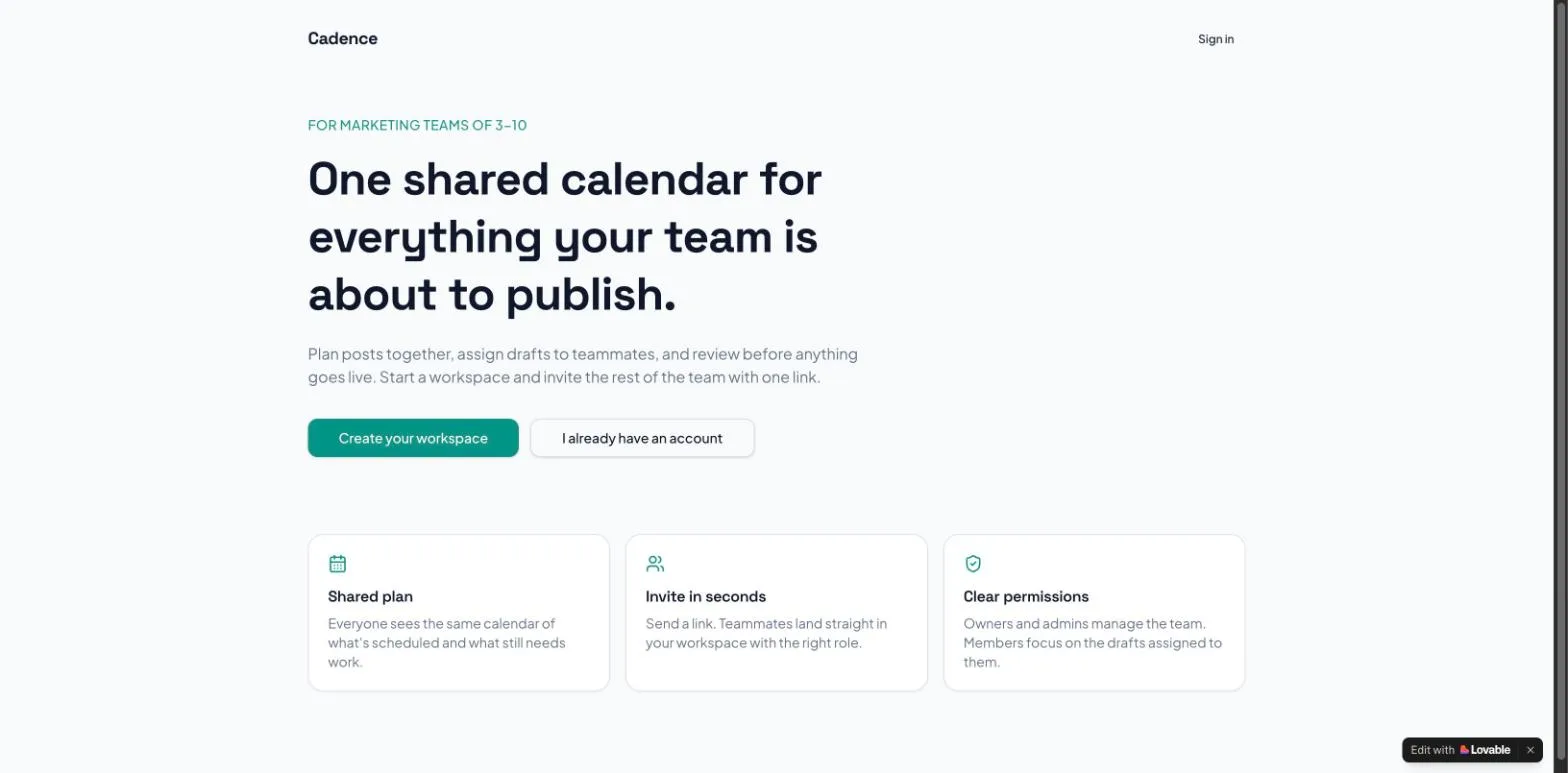
The landing page, 31 July 2026
One round, no follow-up prompts, on the free plan. The whole build, including Lovable enabling its Cloud backend, consumed 1.8 credits of the free plan's 5 daily. All five priority features were present and the inline success state replaced the form after a test submission.
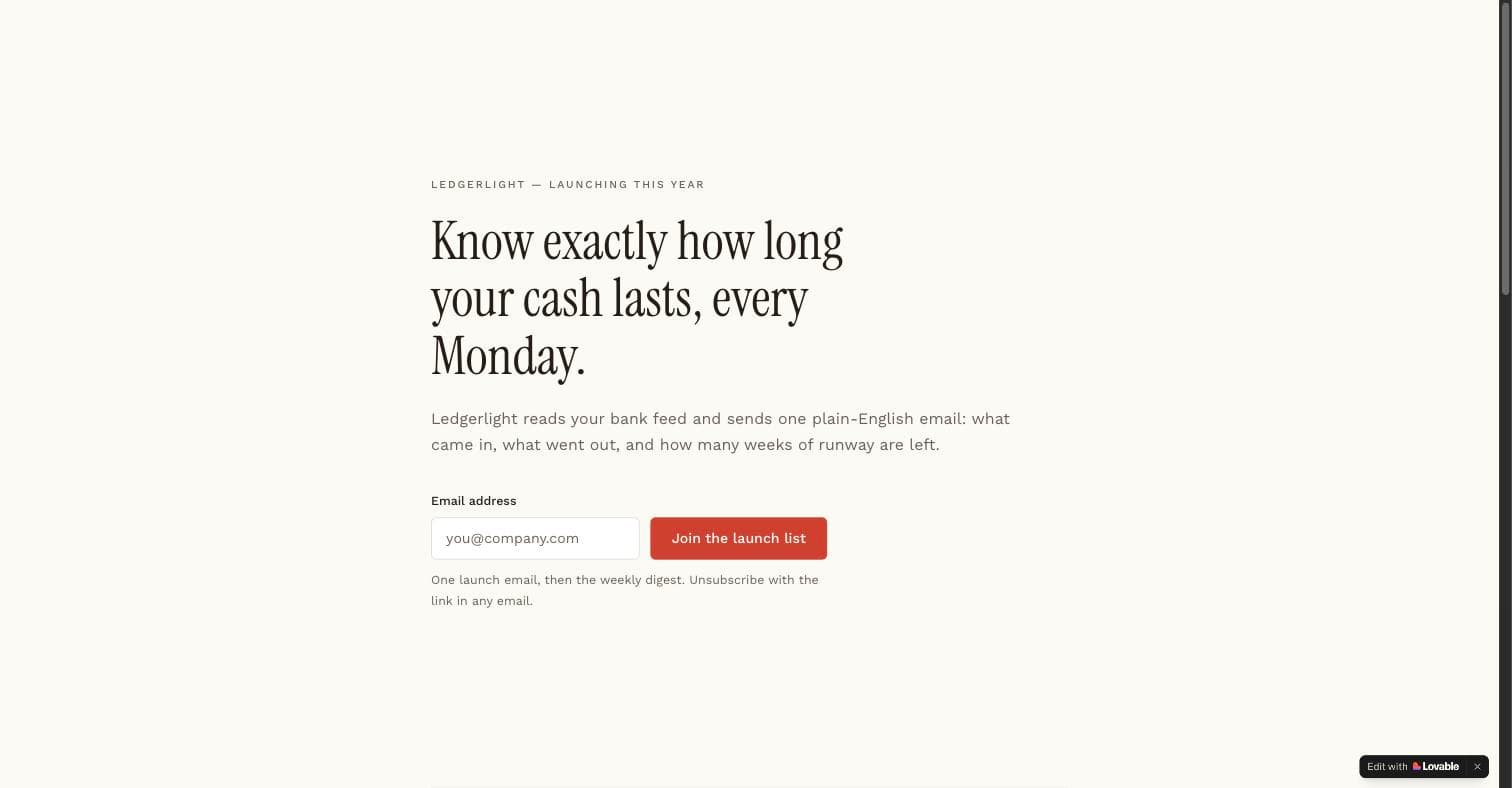
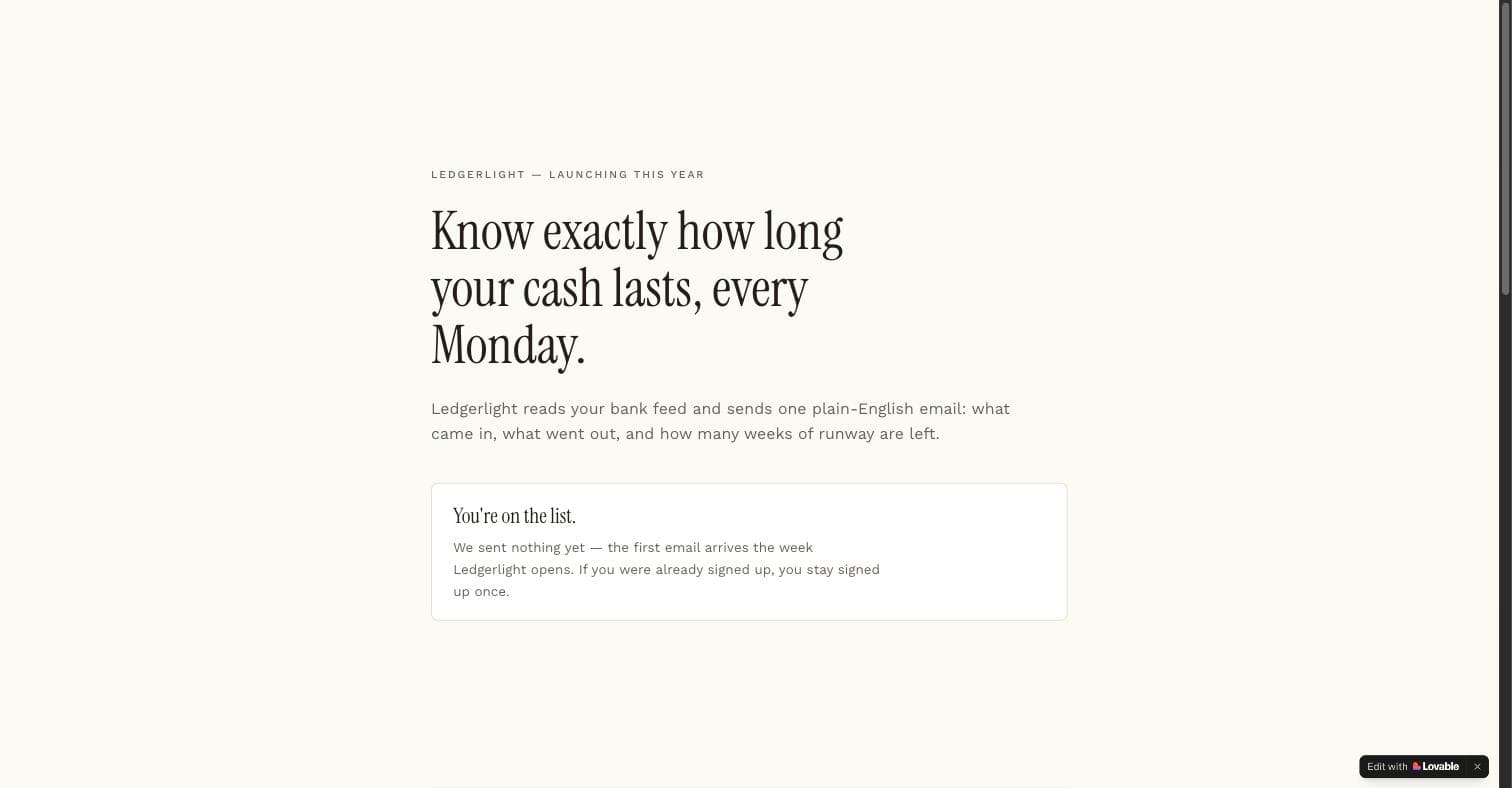
Two honest observations from that run. Lovable respected the safeguard section: it reported the signups table as write-only from server code, with no client reads. And the copy it wrote contained an em dash and an invented brand name, which is why the prompt scopes proof elements to placeholders: the structure came out right on the first try, the words are yours to replace.
The SaaS foundation, 26 September 2026
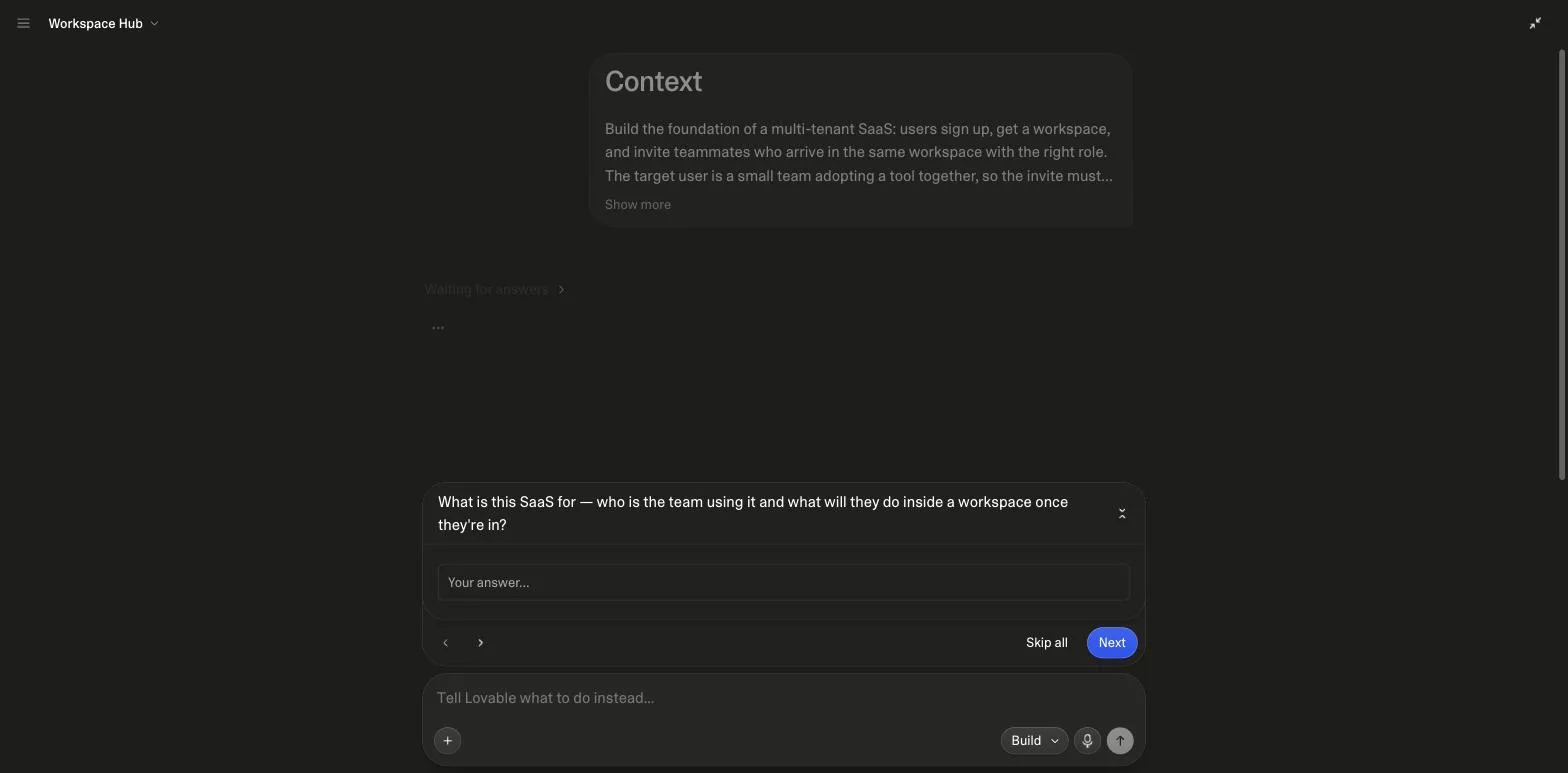
This run was the first with the Before Building line at the end of the prompt, and it changed the shape of the session. Lovable asked four questions before writing code (who the team is and what they do in a workspace, how the first workspace is named, how invites travel, which of three visual directions), then enabled Cloud, built the app, asked permission to sign in as a throwaway invited teammate to test the join flow, and reported that roles are checked in the database on every read and write. It cost 10.4 credits. The full set of screenshots, including the completion report and the credits page, is on the SaaS prompts page.
The states system, 26 September 2026
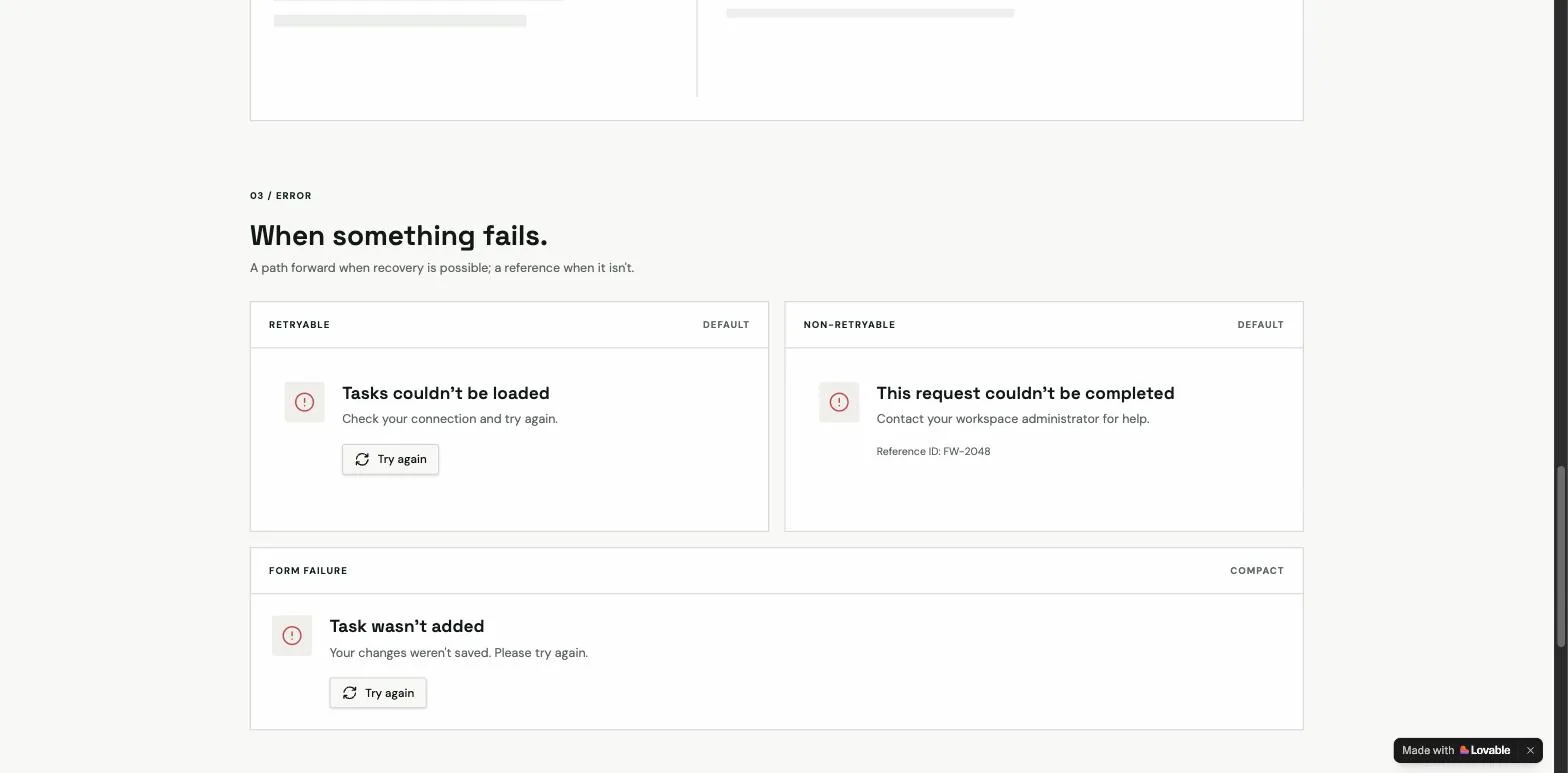
The third run was the Empty States & Loading Skeletons prompt from the UI category, not one of the three annotated above but the best evidence of what a rules section produces. Two questions first, then a gallery page rendering first-use and cleared empties as separate cards, skeletons sized like the rows they replace with a stated delay threshold, retryable and non-retryable errors kept apart, and a partial-data notice. 9.5 credits. The gallery screenshots are on the UI prompts page.
The pattern behind all three
Different categories, same skeleton: the job in the first line, numbered priority, named components instead of adjectives, states and safeguards requested in round one, and a build order that stops Lovable generating UI it cannot wire up. The how-to-write-prompts guide explains each section, including why the structure is also the cheap way to build under Lovable's usage-based pricing.
The other 148 prompts are free in the Lovable prompts library, organised by category and growth channel. If none fits, the generator writes one in this structure for your idea.
Sources
All checked on 26 September 2026.
What changed
- 26 September 2026: two new measured runs (the SaaS foundation and the states system) with screenshots and a credits chart; the reasoning lines re-read against the current prompt bodies; two FAQs, a hero and sources added.
- 31 July 2026: the first run, with the landing page screenshots and the library length chart.
Frequently asked
What happens when you paste one of these prompts into Lovable?↓
How many credits does a prompt from this page cost?↓
Can I copy these prompts directly into Lovable?↓
Why do all the examples follow the same section structure?↓
What is the difference between the base and Pro versions?↓
How many prompts are in the full library?↓
Related reading
- the prompting guide
The structure behind all three examples.
- SaaS prompts
The SaaS MVP prompt's category, with the full run.
- UI prompts
The states gallery run, all screenshots.
- landing page prompts
The July run, below the fold too.
- what the runs cost
Credits read before and after.
- the editor the runs happened in
Chat, preview, code, history.
- the landing page build kit
Schema and queries for the capture path.
- Lovable vs Bolt
The same prompt idea, different meter.
- the CRM build kit
A prompt plus an executed schema.
- Claude Code subagents
A measured run on the CLI side.
- Lovable SEO
The SEO review run on the SaaS project from this page.
- idea to app
The six-step path these runs followed.
- coding prompts
The general form of the prompts run here.
- AI coding tools
The runs on this page, in the wider comparison.
- vibe coding prompts
Ten short prompts, each with its channel.
- Lovable pricing
What these runs cost against the plans.
- Base44 alternatives
These runs as the measured comparison.
- best AI app builder
These runs as the evidence.
- Lovable and Supabase
Roles in the database, per the run.
- Lovable mobile app
The PWA prompt run on the same project.
- Lovable vs v0
Our Lovable runs against v0's documented paths.
- app ideas
The library as fifty ideas, with the three we ran.
- SaaS landing page prompt
A fourth measured run: the SaaS landing page prompt.
- SaaS ideas
The SaaS foundation run, reused across fifteen ideas.
- AI app ideas
The AI prompts as ideas, with Lovable's AI rules.
- how to build an MVP
The same project carried through review, scan, install and landing page, credits totalled.
- MVP examples
The runs as MVP examples, next to Airbnb, Dropbox and Zappos traced.
- build a SaaS
The foundation run as step one of a SaaS.
- prompt engineering examples
The audit's edits as before-and-after pairs, vendor rules quoted.
Written by

Marco Kohns
Founder of ProtoBites - Venture Growth Studio
Growth PM at a Silicon Valley scale-up (a16z and General Catalyst backed), ex-Techstars where he consulted 13 early-stage startups, Reforge-trained. Every prompt on this site comes out of shipping ProtoBites' own portfolio products.