
Common Lovable AI Mistakes, and What Each One Costs
Most lists of Lovable mistakes treat them as style problems. They are billing problems: under Lovable's usage-based Build mode, every mistake below costs at least one correction round, and one of them is a documented security vulnerability class. Each comes with the exact prompt line that prevents it.
Updated
Why mistakes here cost money, not just taste
Lovable's documentation states that Build mode pricing is usage-based and that "small, focused edits usually cost less than larger generations, multi-step changes, or requests that require more codebase exploration, verification, browser checks, web search, or image and video generation." Read as a builder: every vague instruction makes the model explore more, and every correction of a wrong guess is another billable round. A prompting mistake is not an aesthetic slip, it is a purchase of work you did not want. Sources: Lovable's credits and usage documentation and Lovable's own debugging guidance, both re-read on 26 September 2026.
1. Prompting vaguely, then paying to correct the guess
What it costs: Two Build rounds instead of one
THE MISTAKE
Make the dashboard look better and more professional
THE FIX
On the dashboard: use shadcn Card for each metric tile, right-align the numbers in tabular figures, add a 7-day range selector defaulting to open, and show a skeleton (not a spinner) while data loads
Adjectives are not instructions. Lovable fills the gap with defaults, and you pay the correction round. Naming components and values removes the guess.
2. Asking for the whole app at once
What it costs: Everything arrives half-built
THE MISTAKE
Build me a project management app with tasks, teams, chat, calendar, reports and billing
THE FIX
Step 1 of a project tool: task list with statuses (todo, doing, done), create and edit forms with validation, and empty states. Data in Supabase. Nothing else yet.
One prompt cannot prioritise six features, so Lovable spreads effort evenly and you get six weak ones. Staged prompts get one strong feature per round, and later rounds have working context to build on.
3. Skipping empty, loading and error states
What it costs: One retrofit round per screen
THE MISTAKE
(the mistake is the absence: the states are simply never mentioned)
THE FIX
Every list and form includes three states: an empty state prompting the first action, a loading skeleton sized like the final content, and an inline error state with a retry
The happy path demos well and breaks the first time a list is empty, which for a new user is immediately. One sentence in round one, or one paid round per screen later.
4. Forgetting the phone
What it costs: A layout rebuild after launch
THE MISTAKE
(again an absence: no breakpoints, so desktop-only layouts ship)
THE FIX
Mobile-first, breakpoints sm 640px, md 768px, lg 1024px; the table scrolls inside its own container on small screens instead of the page scrolling sideways
Responsive behaviour bolted on later touches every component. Requested up front, it shapes component choice from the start.
5. Letting Lovable invent your social proof
What it costs: A trust liability on a live page
THE MISTAKE
Add a testimonials section to build trust
THE FIX
Add a testimonials section with three placeholder cards clearly marked PLACEHOLDER; do not generate names, companies, star ratings or quotes
Asked for testimonials, Lovable writes plausible ones, complete with names. Fabricated proof on a production page is not a style problem, it is a claim you cannot back.
6. Trusting generated access control
What it costs: The one with a CVE
THE MISTAKE
Add roles so only admins can see the admin page
THE FIX
Enforce roles in the database with row-level security, deny by default; hiding the menu item is not access control. Then verify as a non-admin: selecting other users' rows must return zero rows
Insufficient row-level security in Lovable-generated projects is a documented, public vulnerability class, CVE-2025-48757, published 30 May 2025 and disputed by Lovable on the grounds that customers own their data protection, which is precisely the point: the UI check and the data check are different things, and only the second one protects anything.
7. Restating the feature when 80% was right
What it costs: A large regeneration plus regression risk
THE MISTAKE
That's not what I wanted. Build the booking flow like this: [entire original prompt again]
THE FIX
The booking flow is right except the time picker: it allows past dates. Constrain it to future dates in the venue's timezone and keep everything else unchanged
Re-sending the whole spec triggers a full regeneration, which is billed as one and can break the parts that worked. Correcting the specific miss is a small edit, priced like one.
8. Building with no way to be found
What it costs: An app with zero acquisition surface
THE MISTAKE
(the absence again: features specified, distribution never mentioned)
THE FIX
This app grows through organic search: server-render the public pages, give each city page its own URL and title, and include an FAQ section with structured data
Distribution is product structure, not marketing. An app built for search needs indexable pages; one built for sharing needs an artifact worth posting. Neither can be bolted on the week after launch.
What do you do once a mistake has shipped?
Follow Lovable's own order, which its debugging guide lays out (read on 26 September 2026): the Try to fix button first, with “10 free fixes” that reset every 24 hours; then a description of the bug, what is broken, where, what you expected and what happened; then Plan mode, because “repeated blind fixes tend to pile up code that hides the real problem. Switching to Plan mode after one or two failed attempts is usually faster than trying again”; then revert, from version history or with “Revert and resend” on the message that went wrong. Mistake seven above, restating the whole feature, is what happens when this order is skipped.
- Try to fix: 10 free per 24 hours
- Describe the bug: where, expected, actual
- Plan mode: after 1 to 2 misses
- Approve, build: one scoped change
- Revert and resend: if the path was wrong
Steps from Lovable's debugging guide and Plan mode documentation, read on 26 September 2026. A Plan mode message costs one credit plus any research it runs.
Which of these did our own runs hit or avoid?
Three library prompts have been run unedited in fresh Lovable projects in Marco's own workspace, and each one is a test of this list. On 31 July 2026 the email opt-in landing page came back in one round for 1.8 credits with its states and consent line present (mistakes one to three avoided by the prompt), and the copy Lovable wrote contained an invented brand name, which is mistake five showing up exactly where the prompt had scoped proof to placeholders. On 26 September 2026 the states-system and SaaS prompts, both ending with a line asking Lovable to ask its questions first, produced two and four questions before any build, which is mistake one prevented at the source; the states run then rendered empty, loading, error and partial states as separate, named cards, and the SaaS run reported roles checked in the database on every read and write, which is mistake six handled by the prompt's safe-guard rather than by hope.
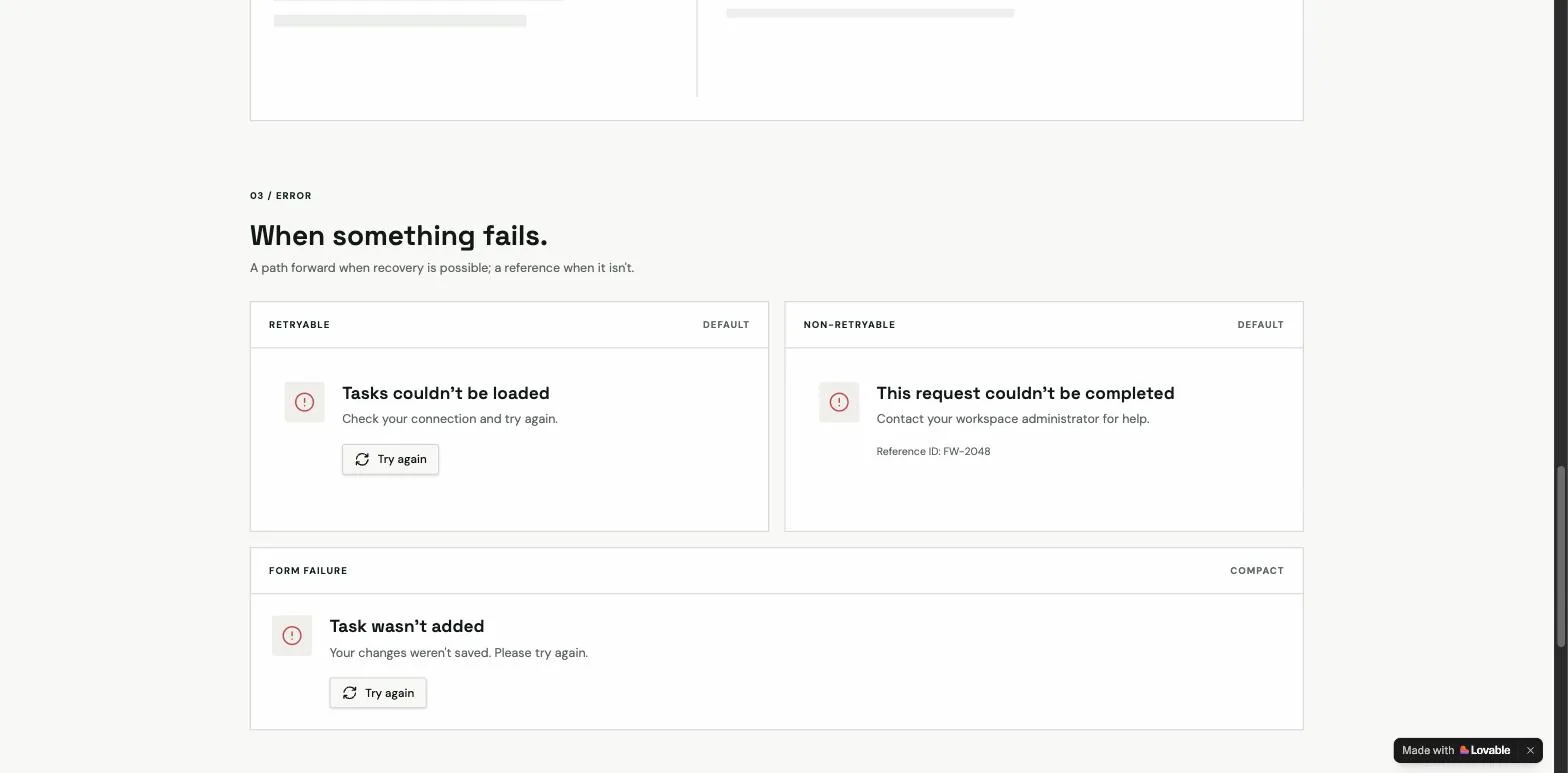
The credits for those runs, 1.8, 9.5 and 10.4, were read from the workspace credits page before and after each one and are charted on the prompting guide; a correction round on a system-level build is a meaningful share of that, which is the whole argument for preventing the mistake in the prompt.
All eight, on one screen
| What it costs | The one-line prevention | |
|---|---|---|
| Prompting vaguely, then paying to correct the guess | Two Build rounds instead of one | On the dashboard: use shadcn Card for each metric tile, right-align the numbers in tabular figures, add a 7... |
| Asking for the whole app at once | Everything arrives half-built | Step 1 of a project tool: task list with statuses (todo, doing, done), create and edit forms with validatio... |
| Skipping empty, loading and error states | One retrofit round per screen | Every list and form includes three states: an empty state prompting the first action, a loading skeleton si... |
| Forgetting the phone | A layout rebuild after launch | Mobile-first, breakpoints sm 640px, md 768px, lg 1024px; the table scrolls inside its own container on smal... |
| Letting Lovable invent your social proof | A trust liability on a live page | Add a testimonials section with three placeholder cards clearly marked PLACEHOLDER; do not generate names, ... |
| Trusting generated access control | The one with a CVE | Enforce roles in the database with row-level security, deny by default; hiding the menu item is not access ... |
| Restating the feature when 80% was right | A large regeneration plus regression risk | The booking flow is right except the time picker: it allows past dates. Constrain it to future dates in the... |
| Building with no way to be found | An app with zero acquisition surface | This app grows through organic search: server-render the public pages, give each city page its own URL and ... |
The prompts that avoid all of this by default
Every prompt in the library carries numbered priority, explicit states, breakpoints, safeguards and a distribution section, which is to say: the corrections above, already written in. The structure behind them is in how to write prompts for Lovable, and the security mistake has a deeper treatment in our free build kits, which ship reviewed row-level security policies plus the verification queries that prove they deny what they should.
Sources
All checked on 26 September 2026.
What changed
- 26 September 2026: the cost quote re-read against the current credits page, the CVE linked to its record with Lovable's dispute stated, a correction-order flow from Lovable's debugging guide, a section on which mistakes our three measured runs hit or avoided with a screenshot, two FAQs, hero and sources.
- 30 July 2026: rewritten from six unsourced pairs to eight priced mistakes with before-and-after prompts.
Frequently asked
How many free fixes does Lovable give before a mistake costs credits?↓
Does a structured prompt actually prevent these mistakes?↓
What is the single most expensive Lovable mistake?↓
Why does my Lovable app break when a list is empty?↓
Is it a mistake to build the whole app in one prompt?↓
What is the security mistake?↓
Related reading
- how to write prompts for Lovable
The structure that prevents most of these.
- Lovable's debugging order, in detail
Try to fix, describe, Plan mode, revert.
- backend prompts that enforce access in the database
The fix for mistake six.
- the states prompt
The fix for mistake three, run and shown.
- build kits with tested row-level security
Policies executed, not described.
- why a mistake is a billing event
Build mode is usage-based.
- building with a way to be found
Mistake eight, solved before the prompt.
- the Replit incident
What an agent with too much permission did.
- Cursor rules that stop the same mistakes locally
A glob-scoped RLS rule for supabase/.
- a subagent that reviews guides for these mistakes
The guide-reviewer definition.
- Lovable SEO
The sitemap and internal-link mistakes that cost us months.
- idea to app
The path that avoids the rebuild.
- the CLAUDE.md file
Rules Claude follows, and the gates behind them.
- vibe coding prompts
First prompts that carry the safeguard.
- vibe coding tips from our git log
Twelve mistakes that shipped, and the fixes.
- Lovable and Supabase
The three RLS failures and the lines that prevent them.
- prompt engineering examples
Six prompt edits and what each changed, measured where run.
- what is vibe coding
The public record on AI-written code, with sample sizes.
Written by

Marco Kohns
Founder of ProtoBites - Venture Growth Studio
Growth PM at a Silicon Valley scale-up (a16z and General Catalyst backed), ex-Techstars where he consulted 13 early-stage startups, Reforge-trained. Every prompt on this site comes out of shipping ProtoBites' own portfolio products.