
Lovable SaaS Prompts: 15 Templates for Auth, Roles and Billing
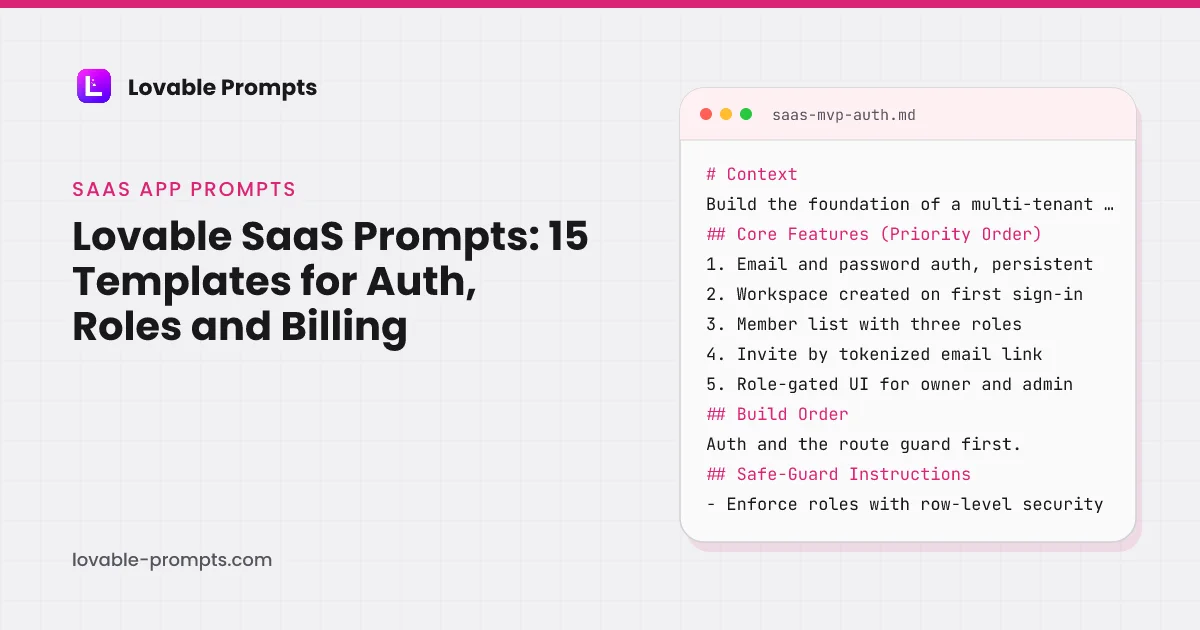
The gap between a Lovable demo and a SaaS product is almost never the feature list. It is auth that survives a refresh, roles that actually gate something, billing that reconciles with the payment provider, and a trial that ends. Those four are where generated apps quietly stop being products, and they are what the fifteen prompts here specify first.
Order matters more here than in any other category. Entitlement logic written after the UI has to be threaded back through every screen, so the prompts are sequenced to put access control before anything that depends on it. The first of them, SaaS MVP with User Auth, is the most upvoted prompt in the whole library, and we ran it in a fresh Lovable project on 26 September 2026; what came back, and what it cost, is below.
SaaS MVP with User Auth
What this prompt is for
A multi-tenant SaaS starting point: auth that survives refresh, three working roles, and an invite flow that actually adds teammates.
When to use it
Starting any SaaS where users belong to a workspace. Run this before building screens, because retrofitting roles touches every one of them.
How to Use This Prompt
This prompt covers one step of a multi-step build.
For best results, consider building your app in layers:
- Foundation
- Features
- Distribution
The base version of this app is built: auth, workspaces, three roles, and a working invite. This prompt adds the growth mechanics, because a team tool that spreads by invite is its own acquisition channel.

## Growth Features (Required for Distribution)
- **Product-led Growth:** make the invite the loop. Show who invited whom on the member list, confirm to the inviter when an invite is accepted, a
Like what you see?
This is a free preview of a Pro prompt. All 93 channel-optimized variants are in the bundle.
Subscription Checkout Flow
What this prompt is for
A Stripe subscription flow whose states all exist: checkout, success, failure, cancel, and the webhook that keeps the app honest.
When to use it
Adding paid plans to an app whose entitlements are already defined. If plans do not gate anything yet, define that first or the checkout sells nothing.
# Context
Add paid subscriptions to an existing app using Stripe Checkout. Entitlements per plan are already defined in the app; this prompt wires purchase, verification and lifecycle. Trust the webhook, not the redirect.

## Core Features (Priority Order)
1. Plan selection UI reading plan definitions from one config object
2. Stripe Checkout session creation on the server, never exposing the secr
Channel-Optimized Pro Version
This prompt has a Pro version optimized for Organic SEO. Unlock to get product-channel fit guidance and distribution-ready features.
Product Roadmap Planner
What this prompt is for
A public-or-private roadmap board: columns by stage, drag to reprioritize, and a changelog that writes itself from shipped cards.
When to use it
When 'what are you building next' becomes a recurring question from users or stakeholders and answering it by email stops scaling.
# Context
Build a roadmap planner for a product team: cards move across stage columns, order within a column matters, and shipped work becomes a changelog entry without retyping. Decide visibility per board: internal or public read-only.

## Core Features (Priority Order)
1. Board with four columns: Ideas, Planned, In Progress, Shipped
2. Cards: title, one-paragraph description, tags, target quart
Channel-Optimized Pro Version
This prompt has a Pro version optimized for Organic Socials. Unlock to get product-channel fit guidance and distribution-ready features.
Payment History & Billing Pages
What this prompt is for
Customer-facing billing: invoice history, payment method management, and plan changes, driven by Stripe as the source of truth.
When to use it
After checkout works. This is the page that stops billing support emails, so build it before the first renewal, not after the first complaint.
# Context
Build the customer billing area for an app that already has Stripe subscriptions. Users need to see what they paid, change their card, and change their plan without emailing support. Stripe is the source of truth; this page displays it.

## Core Features (Priority Order)
1. Invoice history list: date, amount, status, hosted invoice link
2. Current plan card with change-plan and cancel ac
Channel-Optimized Pro Version
This prompt has a Pro version optimized for Email Marketing. Unlock to get product-channel fit guidance and distribution-ready features.
Lead Scoring System
What this prompt is for
Rules-based lead scoring you can explain to a sales team: transparent point rules, score history, and a ranked queue that updates as behavior happens.
When to use it
When inbound volume exceeds what one person can eyeball and 'reply to everyone' stops being a strategy. Rules first; models only after rules prove insufficient.
# Context
Inbound leads arrive from forms and product signups. Build transparent lead scoring: named rules award points on attributes and behavior, every score is explainable, and sales works from a ranked queue instead of a chronological inbox.

## Core Features (Priority Order)
1. Rules table: condition, points, active toggle (e.g. company email +10, pricing page visit +15)
2. Score per lead com
Channel-Optimized Pro Version
This prompt has a Pro version optimized for B2B Sales. Unlock to get product-channel fit guidance and distribution-ready features.
SaaS Teams & Permissions Manager
What this prompt is for
Team management for an existing multi-tenant app: role changes, removals, and transfers that hold up in the database, not just the UI.
When to use it
When the second admin arrives. Solo-owner workspaces do not need this yet, and building it early adds schema you will have to migrate.
# Context
An app with workspaces and basic roles exists. Build the management layer: changing roles, removing members, and transferring ownership, with the rules enforced in the database and every change recorded.

## Core Features (Priority Order)
1. Member table: name, email, role, last active, joined date
2. Role changes via inline select, owner and admin only
3. Member removal with confirmatio
Channel-Optimized Pro Version
This prompt has a Pro version optimized for Product-led Growth. Unlock to get product-channel fit guidance and distribution-ready features.
Customer Churn Predictor
What this prompt is for
Churn risk from signals you already store: a transparent risk score per account, the reasons beside it, and a weekly movers list.
When to use it
When you have at least a few months of usage history and enough customers that you cannot hold their health in your head. Before that, just call them.
# Context
A SaaS stores logins, feature usage, billing events and support tickets. Build a churn-risk view: a 0-100 risk score per account from weighted named signals, always shown with its reasons, plus a weekly view of who moved.

## Core Features (Priority Order)
1. Signals config: recency of login, 30-day usage trend, failed payments, seat shrinkage, ticket sentiment flag
2. Risk score per acc
Channel-Optimized Pro Version
This prompt has a Pro version optimized for Email Marketing. Unlock to get product-channel fit guidance and distribution-ready features.
Product Feature Toggle Manager
What this prompt is for
Feature flags with tier awareness: flags scoped by plan or percentage, evaluated server-side, with an audit trail of every change.
When to use it
The first time you want to ship something to 10% of users, or gate a feature by plan without a deploy. Before the second flag exists, hardcode it.
# Context
Build a feature flag system for a multi-tenant SaaS: flags gate features by plan tier, percentage rollout, or explicit account list, evaluated server-side through one function, with an admin UI and a change log.

## Core Features (Priority Order)
1. Flags: key, description, on/off, targeting (all, plan tiers, percentage, account list)
2. One server-side evaluation function used by every
Channel-Optimized Pro Version
This prompt has a Pro version optimized for Product-led Growth. Unlock to get product-channel fit guidance and distribution-ready features.
Promo Code & Discounts Manager
What this prompt is for
Promo codes with the abuse cases handled: creation, redemption, stacking rules, and expiry, enforced at payment time on the server.
When to use it
Before your first discount campaign. Hand-editing prices per customer does not scale past the first newsletter, and un-expiring codes circulate forever.
# Context
An app with paid plans needs promo codes: created by an admin, redeemed at checkout, honest about expiry, and resistant to the usual abuse. Codes influence price only at the moment of payment, server-side.

## Core Features (Priority Order)
1. Admin creation: code, type (percent or fixed), applicable plans, max redemptions, expiry
2. Redemption field at checkout with instant server valid
Channel-Optimized Pro Version
This prompt has a Pro version optimized for Email Marketing. Unlock to get product-channel fit guidance and distribution-ready features.
AI Product Recommendation Engine
What this prompt is for
Behavior-driven product recommendations with an honest fallback ladder: personal history, then similar users, then bestsellers, never an empty shelf.
When to use it
When a catalog is big enough that browsing fails, and you have at least some behavioral data. Under that, curated collections beat any algorithm.
# Context
An app with a catalog and user behavior events (views, saves, purchases) needs recommendations: a personal shelf per user, similar-item rows on detail pages, and an explicit fallback ladder so no surface is ever empty.

## Core Features (Priority Order)
1. Event capture: view, save, purchase per user per item, timestamped
2. A 'For you' shelf: recency-weighted category and attribute affi
Channel-Optimized Pro Version
This prompt has a Pro version optimized for Email Marketing. Unlock to get product-channel fit guidance and distribution-ready features.
SaaS User Onboarding Checklist
What this prompt is for
An onboarding checklist wired to live product events: steps complete themselves when the user does the thing, not when they click 'done'.
When to use it
Once you know the two or three actions that predict retention. Before that, ship without onboarding and watch what activated users actually did first.
# Context
An app knows which three actions predict whether a new user sticks. Build an onboarding checklist that drives those actions, verifies them from live events, and gets out of the way when done.

## Core Features (Priority Order)
1. A checklist of 3 to 5 steps, each mapped to a verifiable product event
2. Auto-completion: doing the thing checks the step, wherever it was done
3. Progress per
Channel-Optimized Pro Version
This prompt has a Pro version optimized for Product-led Growth. Unlock to get product-channel fit guidance and distribution-ready features.
SaaS Usage Limits & Quotas Manager
What this prompt is for
Plan-tier limits that are enforced where they must be and visible where they help: server-side gates with honest usage meters in the UI.
When to use it
Before checkout ships. Selling plans whose limits nothing enforces means every customer is on the top tier, and clawing that back later is a support disaster.
# Context
An app has plan tiers with defined limits (per-month actions, storage, seats). Build the enforcement and the visibility: limits that hold on the server, and meters that tell users where they stand before they hit a wall.

## Core Features (Priority Order)
1. One plan-limits config object: every limit defined once, imported everywhere
2. Server-side enforcement at each metered action, fai
Channel-Optimized Pro Version
This prompt has a Pro version optimized for Product-led Growth. Unlock to get product-channel fit guidance and distribution-ready features.
SaaS Trial Expiration Flow
What this prompt is for
A trial that actually ends: countdown, honest lockout, data retention, and the reactivation path, driven by dates on the server.
When to use it
The day trials launch. A trial without an enforced end is a free plan you did not mean to offer, and it is this site's most common revenue leak in generated SaaS.
# Context
An app offers a 14-day trial of its paid features. Build the full lifecycle: visible countdown, expiry that actually restricts, retained data, and a clean path back. The trial end must hold even if the user never opens the app again.

## Core Features (Priority Order)
1. trial_ends_at set server-side at signup; all logic derives from it
2. A countdown surface: subtle until 3 days remain,
Channel-Optimized Pro Version
This prompt has a Pro version optimized for Email Marketing. Unlock to get product-channel fit guidance and distribution-ready features.
SaaS In-App Announcement Banner
What this prompt is for
In-app announcements with targeting and dismissal that stick: plan- and behavior-scoped banners users see once, not forever.
When to use it
When product updates matter to some users and not others, and email is too slow or too blunt for 'this changed today'.
# Context
Build in-app announcements for a SaaS: admins publish targeted messages (new feature, maintenance, plan changes) that render as non-blocking banners or cards, dismiss permanently per user, and expire on schedule.

## Core Features (Priority Order)
1. Admin composer: title, body, type (info, feature, warning), placement (banner or card)
2. Targeting: all users, plan tiers, or a behavior f
Channel-Optimized Pro Version
This prompt has a Pro version optimized for Product-led Growth. Unlock to get product-channel fit guidance and distribution-ready features.
SaaS Audit Log Viewer
What this prompt is for
An append-only audit log with a viewer that answers who did what when: filterable, exportable, and honest about being immutable.
When to use it
The first time a customer's security review asks for it, or earlier if you handle data whose access needs accounting. Retrofitting capture is expensive; capture early, view later.
# Context
Build audit logging for a multi-tenant SaaS: security-relevant actions are captured append-only, and admins get a viewer that answers who did what, when, to what, with filters and export.

## Core Features (Priority Order)
1. Capture: actor, action, target type and id, timestamp, IP, and a compact context object
2. Coverage of the actions that matter first: auth events, role changes, dat
Channel-Optimized Pro Version
This prompt has a Pro version optimized for B2B Sales. Unlock to get product-channel fit guidance and distribution-ready features.
Every Prompt, Every Kit, One Payment
All 15 prompts plus every Pro variant and build kit in one bundle, plus unlimited prompt generation, $199 once. Or sign up free to copy prompts one at a time.
Browse More Categories
Related Resources
The Complete Lovable Bundle
$199 once. Unlimited generation, every prompt, every kit, every future dropEvery prompt, every Pro variant, all four build kits and every future drop, in one Notion workspace. One payment, never a subscription.
Get the 151-Prompt BundleWhich growth channels do these prompts serve?
Every prompt in this category carries a distribution section naming the channel it is built for, so the generated app has a way of being found rather than only a feature set. The chart counts primary and secondary coverage together, computed from the prompt bodies when the site is built.
| Category | prompts |
|---|---|
| Email Marketing | 11 |
| Product-led Growth | 10 |
| B2B Sales / LinkedIn | 4 |
| Organic SEO / AI Search | 2 |
| Organic Socials | 2 |
| Community-led Growth | 2 |
Computed from the channel mapping in each prompt at build time; a prompt can serve more than one channel.
What is a Lovable SaaS prompt, and what does the first generated version usually lack?
A Lovable SaaS prompt is a Build mode message that specifies the parts of a subscription product the demo leaves out: who can sign in, what a role is allowed to do, what a plan grants, how money is reconciled, and what happens when a trial ends. Lovable's authentication docs describe the easy half honestly: "Ask Lovable to add login, and it generates the signup and login pages, wires them to your backend, and protects user data with row level security", with email, phone, Google, Apple, Microsoft and SAML SSO available on the built-in Cloud backend (read on 26 September 2026).
What that sentence does not cover is the SaaS half. A login page does not decide that an admin can invite and a member cannot, that a role is read from the database on every request rather than trusted from the client, or that an expired invite link shows an error and a way to request a new one. Those are product rules, and Lovable's prompting best practices say the prompt has to carry them: "what to build, where it goes, and what must stay untouched". Every prompt in this category has a rules section for exactly that, named for the thing it governs: Access & Session Rules, Payment States, Role Matrix, Enforcement Points, Lifecycle Timers.
How is a SaaS prompt in this library built?
The SaaS MVP prompt is the reference, because every other prompt in the category assumes it has run. Its sections, read from the prompt body, are below. Access & Session Rules is the part a feature request never carries, and its first line is the whole security model in one sentence: roles are read from the database per request, never from client state. The Safe-Guard section then repeats it from the other side, that hiding a button is not access control, which is the mistake behind the row-level-security findings in generated Lovable apps covered in common Lovable mistakes.
- Context: A small team adopting a tool together; the invite comes first.
- Core Features (Priority Order): Auth, workspace, three roles, tokenized invite, role-gated UI.
- Access & Session Rules: Roles from the database per request, never from the client.
- Screens & States: Inline validation, member-list skeleton and empty state.
- Build Order: Auth and guard, then the role helper, then reads, then invites.
- Safe-Guard Instructions: Row-level security; never trust a role or workspace id from the client.
- Before Building: Lovable asks its questions, then saves the answers.
Headings read from the prompt body of saas-mvp-auth in this library.
The Before Building section at the end was added to all 101 prompts on 26 September 2026 from Lovable's docs: the best-practices page recommends ending a prompt with "Ask me any questions you need in order to fully understand what I want from this feature and how I envision it", and the prompt library says to save decisions to the project knowledge so "every later prompt builds on them automatically". On a SaaS prompt the questions it produces are the useful kind: who the workspace is for and what the first screen holds.
What happened when we ran the SaaS MVP prompt in Lovable?
On 26 September 2026 we pasted SaaS MVP with User Auth, unedited, into a fresh project in Marco's own Lovable workspace, in Build mode. Before writing any code Lovable asked four questions, one at a time: what the SaaS is for and who the team is, how the first workspace should be named at sign-up, how invites should reach teammates for a first version, and which of three visual directions fits. We answered a content-planning tool for marketing teams of three to ten, workspace name asked during sign-up, copyable invite links only, and the first palette. It then enabled Lovable Cloud for data and sign-in, built the app, and asked permission to sign in as a throwaway invited teammate to test the join flow, which we allowed.
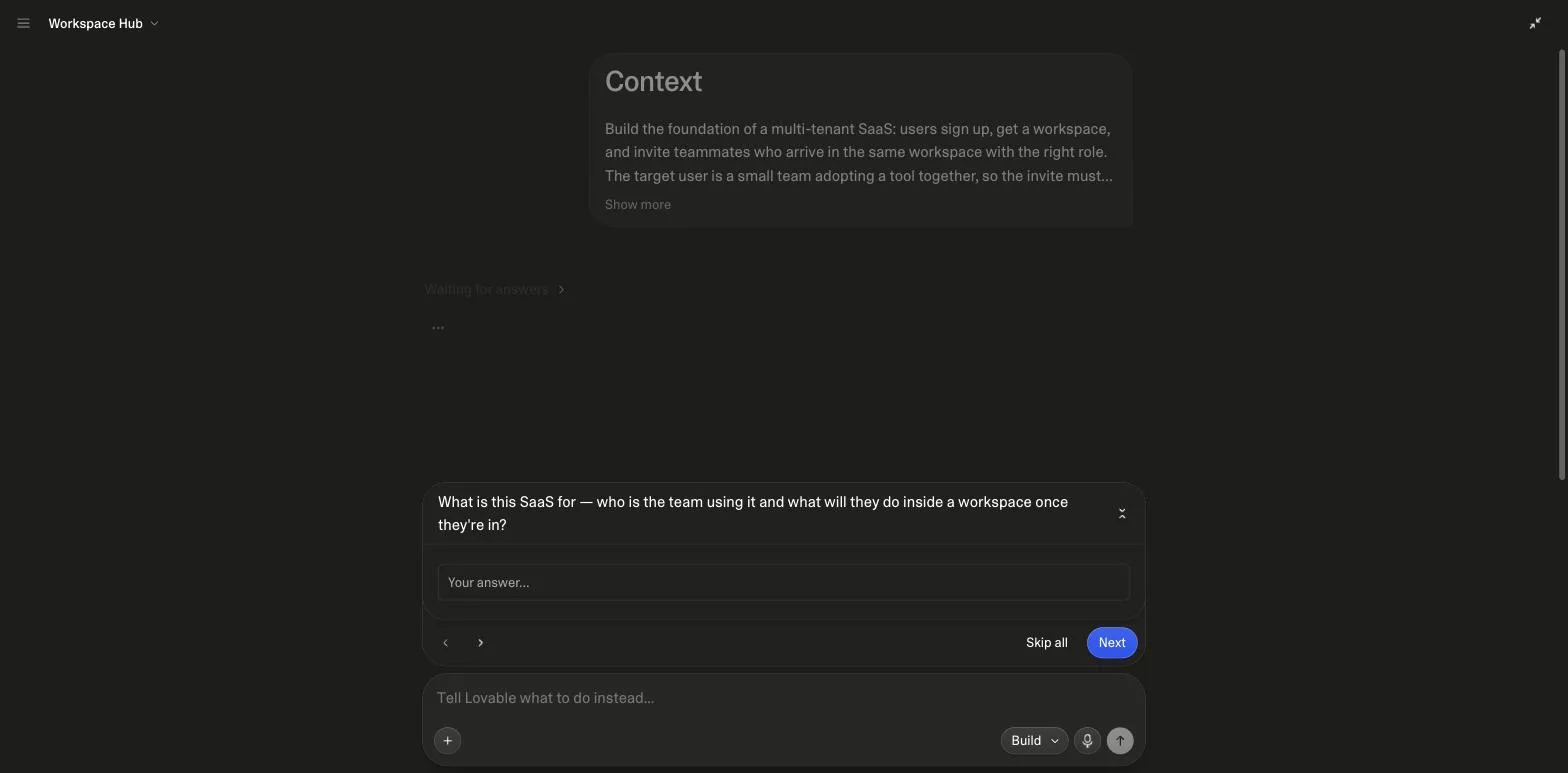
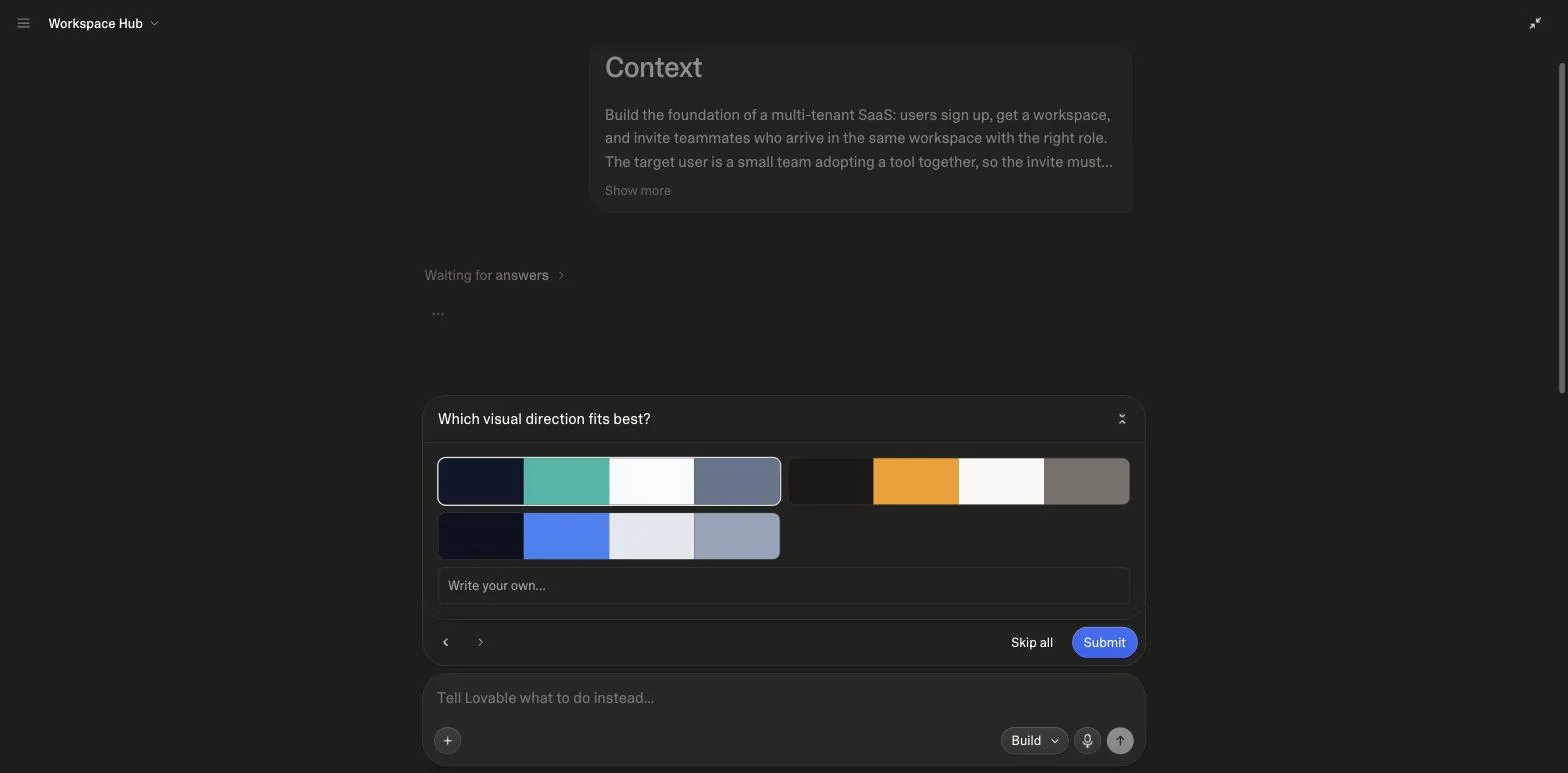
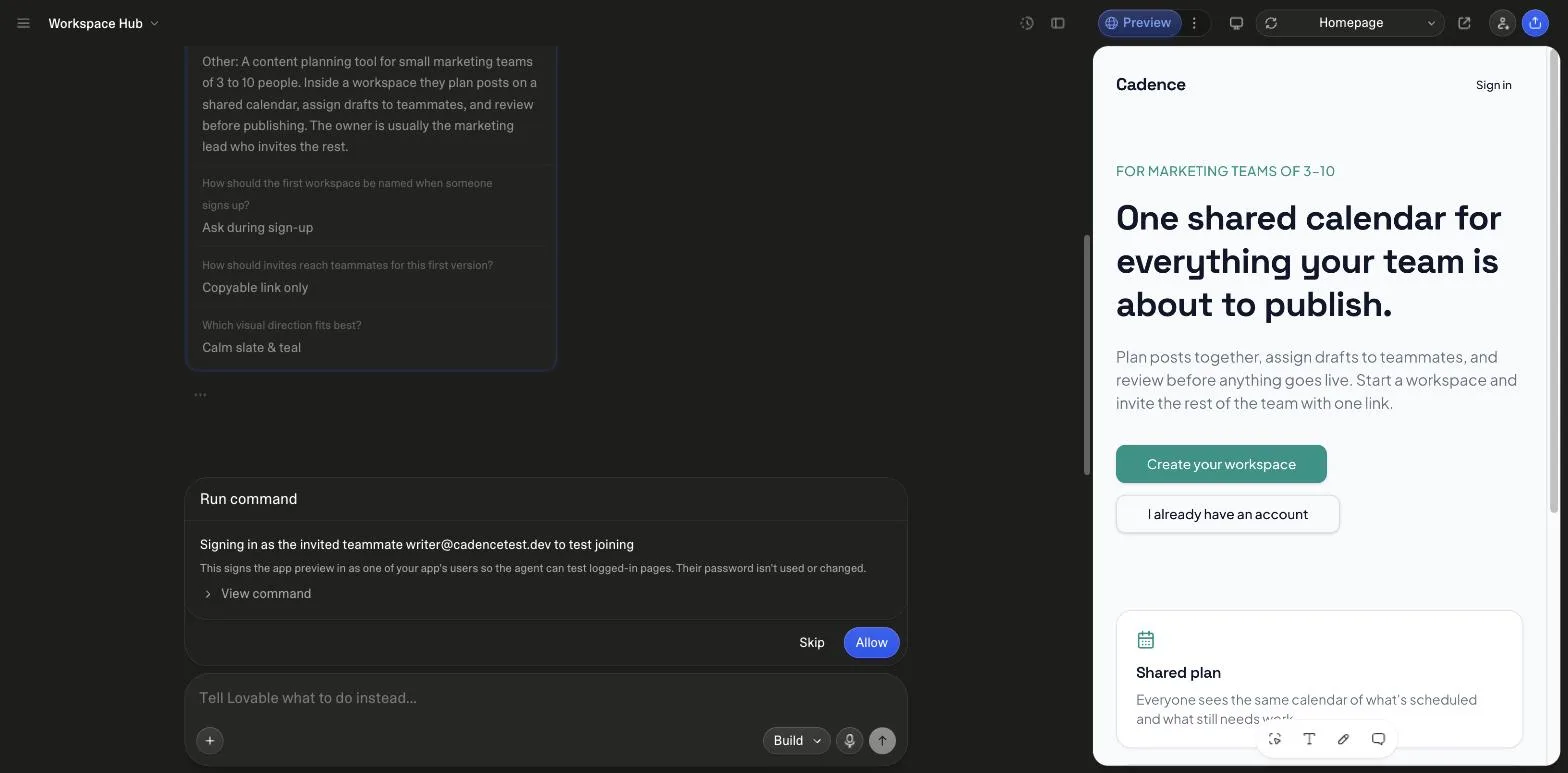
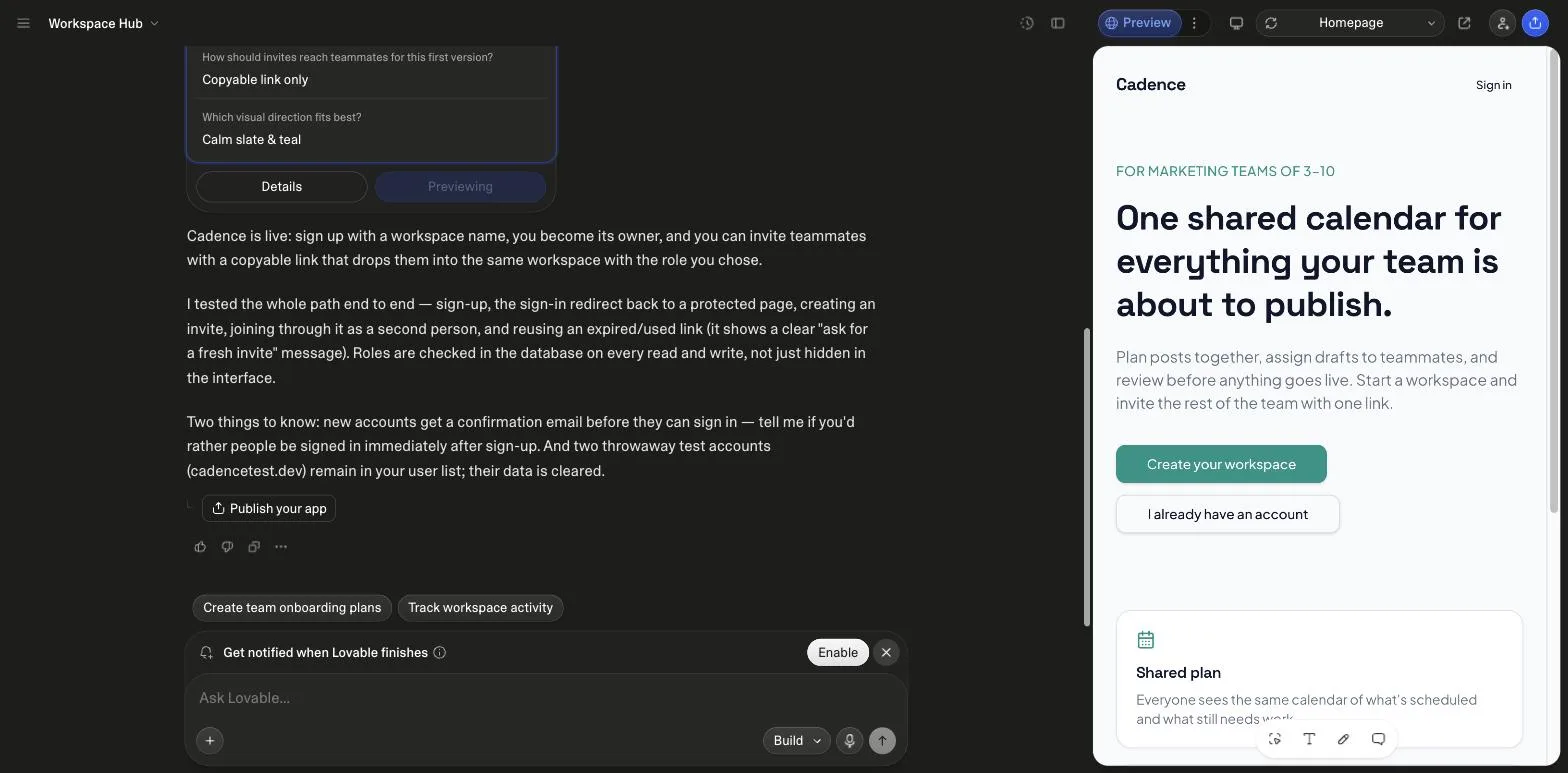
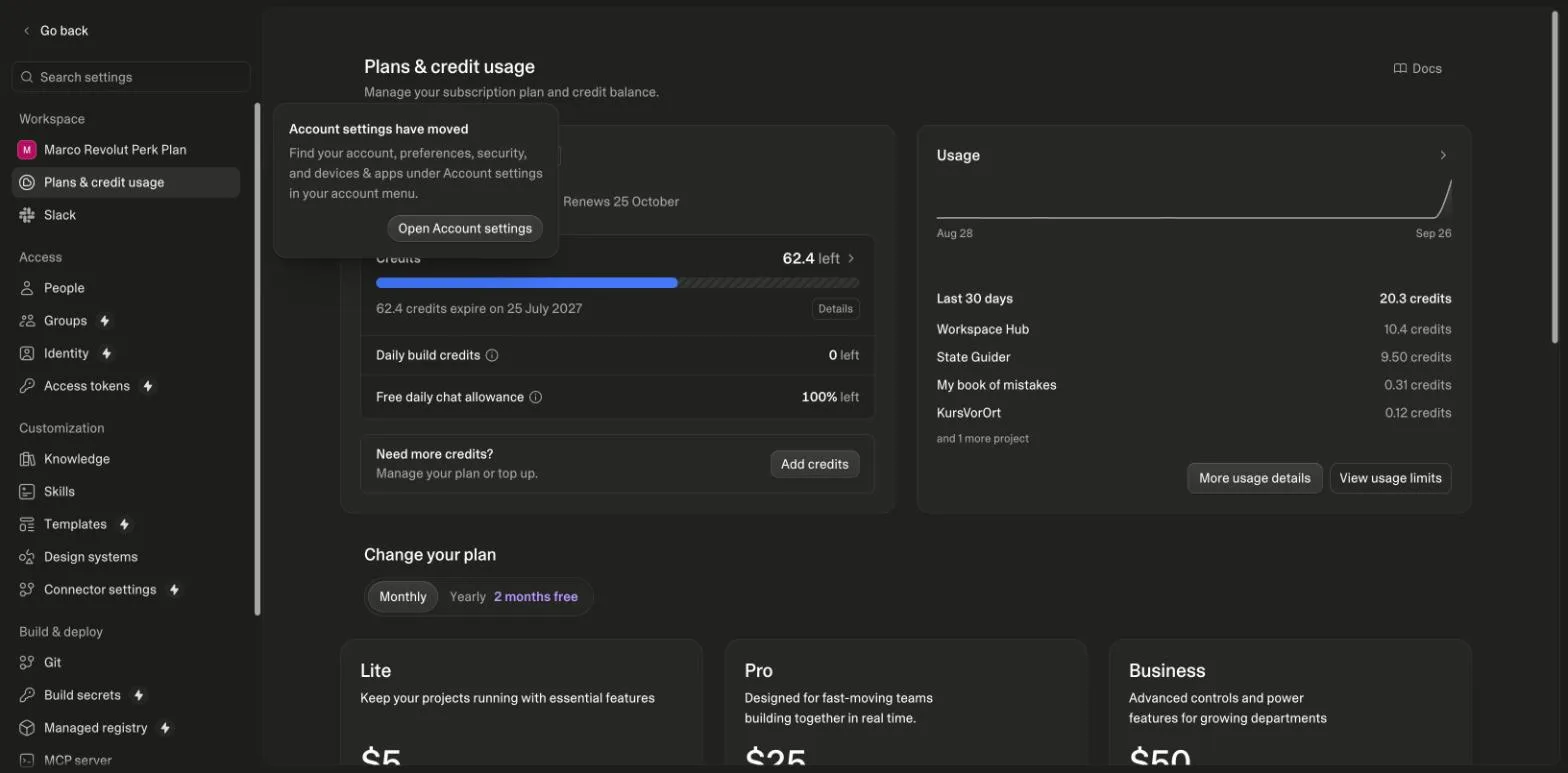
Its completion report is the artifact: sign-up with a workspace name makes you owner; invites are copyable links that drop a teammate into the workspace with the chosen role; it tested sign-up, the redirect back to a protected page, creating an invite, joining as a second person and reusing an expired link, which shows an ask-for-a-fresh-invite message; and, in its words, roles "are checked in the database on every read and write, not just hidden in the interface", which is the Safe-Guard line of the prompt read back. It also flagged two things a reader should know: new accounts confirm by email before signing in, and two test accounts remain in the user list with their data cleared. Cost, read from the credits page before and after: 72.8 to 62.4 credits, and the usage list shows the project at 10.4 credits. Against the 9.5 for the states system and 1.8 for a landing page, that is the range to plan with for a foundation prompt that provisions a backend, auth and a tested invite flow.
How does Lovable handle payments, and what does that change in the billing prompts?
Lovable has built-in payments, and the rules are specific. Its payments documentation says apps can "accept subscriptions and one-time payments" through a built-in Paddle or Stripe integration, that "built-in payments require a paid Lovable plan" while "on the Free plan, you can connect your own Stripe account instead", that test mode applies in the preview and live mode after publishing with products syncing from one to the other, that Paddle charges 5.0% plus 50 cents per transaction (10% flat under $10) while Stripe bills its standard rates, and that the default is "one subscription per user per environment" (all read on 26 September 2026). Subscriptions with tiers, one-time purchases, free trials and discount codes are supported.
| Built-in payments (Paddle or Stripe) | Connected Stripe account | |
|---|---|---|
| Plan needed | A paid Lovable plan | Any plan, including free |
| Setup | Lovable creates the accounts and wiring from a prompt | Your keys, server-side session creation, your webhook endpoint |
| Test to live | Test mode in preview, live after publishing, products sync | Your Stripe test and live keys, switched by you |
| Fees stated by Lovable | Paddle 5.0% + 50 cents (10% under $10); Stripe standard rates | Stripe standard rates |
| Subscriptions per user | One per environment by default | Whatever your schema allows |
| Where the prompts here fit | Entitlements and states still have to be specified | Checkout and billing prompts as written |
- Auth and roles: SaaS MVP prompt
- Define entitlements: usage limits prompt
- Checkout: webhook is the truth
- Test in preview: test cards only
- Publish, go live: products sync over
Order from the build-order rule in this category and Lovable's payments documentation (test mode in preview, live mode after publishing), read on 26 September 2026.
The two billing prompts here, Subscription Checkout Flow and Payment History & Billing Pages, were written for a connected Stripe account, which is the free-plan path and the one that gives you the webhook. That is deliberate: the checkout prompt's rule that "the webhook is the source of truth" holds on either path, and the built-in flow does not remove the need to define entitlements before you sell them. The flow below is the order that avoids rework, whichever provider you end up on.
How do these compare with SaaS boilerplates and the other Lovable prompt sites?
Lovable's own guide to SaaS boilerplate templates (about 4,200 words, dated 2 May 2026, read on 26 September 2026) lists the usual starter kits and makes the case that Lovable replaces them: "you describe what you're building, and the architecture follows your requirements". That is true, and it is also the problem these prompts solve, because a description that does not name the role model or the entitlement rules produces an architecture without them. A boilerplate hard-codes a permission model you then unpick; a one-line prompt produces none.
The other Lovable prompt sites that rank for SaaS searches list template names with a view-prompt link, no full text on the page, no build order, no row-level-security rules and no run evidence (checked the same day). The prompts here show the full base prompt on the card, sequence the category, and carry the security rules in the prompt body, which is the part a template can never do for you because it depends on your roles and your plans.
Which SaaS App prompts do builders upvote most?
Every card on this page carries an upvote, one per visitor, and the cards are sorted by it. The counts below are read from the database when the page is rendered and refresh hourly, so they can lag a card by a vote or two. They are the first thing we look at when deciding which prompt in a category to extend.
| Category | upvotes |
|---|---|
| SaaS MVP with User Auth | 33 |
| Lead Scoring System | 5 |
| Product Roadmap Planner | 4 |
| Subscription Checkout Flow | 4 |
| SaaS Teams & Permissions Manager | 4 |
| Product Feature Toggle Manager | 3 |
Upvotes recorded on lovable-prompts.com since January 2026 for this category, 61 in total, one vote per visitor. Read from the database at render time.
Which SaaS prompt to use
If you are starting, SaaS MVP with User Auth is the entry point and the only prompt on the site whose Pro version is visible to everyone, so it doubles as a worked example of what the Pro layer adds.
If you are adding money, Subscription Checkout Flow and Payment History & Billing Pages are the pair, and Promo Code & Discounts Manager only after those two work. If you are adding teams, SaaS Teams & Permissions Manager and the Role-Based Access Control prompt in the backend category cover the two halves: the screens and the rules.
If the problem is retention rather than acquisition, SaaS User Onboarding Checklist, SaaS Trial Expiration Flow and Customer Churn Predictor address the three points where trials quietly stop converting.
Suggested build order
Access control first, then money, then the lifecycle. Every reordering of this list creates rework. Lovable's idea-to-app guide makes the same point for any product: build in small loops, one change per prompt, and add the backend when data has to survive a refresh, which for a SaaS is the first screen.
Auth and roles
Protected routes and role checks before any screen that depends on them.
Prompt: SaaS MVP with User Auth
Entitlement before billing
Decide what a plan grants before you charge for it, or the checkout sells something undefined.
Prompt: SaaS Usage Limits & Quotas Manager
Then checkout
With entitlement already defined, the checkout has something concrete to sell. Test mode in the preview, live after publishing.
Prompt: Subscription Checkout Flow
Close the lifecycle
Trials that never end are the most common revenue leak in a generated SaaS.
Prompt: SaaS Trial Expiration Flow
Where SaaS prompts usually go wrong
- Trusting the database to enforce the plan. Ask for entitlement checks in application code and be explicit that a stubbed permission function is not enforcement. This site's own database had exactly that bug: a plan check that always returned false.
- Building the pricing page before deciding what a plan grants. The page then describes tiers the app cannot distinguish between.
- Letting Lovable generate the payment integration unsupervised. Prompt for the flow and the states, then review the provider calls by hand. This is the one area where a plausible-looking generation is genuinely dangerous.
- Expecting built-in payments on the free plan. Lovable's docs say built-in Paddle or Stripe payments need a paid plan; on the free plan you connect your own Stripe account, which is what the billing prompts here are written for.
Frequently asked
Can Lovable build a production SaaS?↓
It can build the application layer, and it does that quickly. What it does not do unprompted is enforce entitlements, reconcile billing state with the payment provider, or handle trial expiry. Those are specified explicitly in these prompts because they are where a generated SaaS stops being a product.
Does Lovable have built-in payments?↓
Yes. Lovable's payments docs describe a built-in Paddle or Stripe integration for subscriptions and one-time payments, with test mode in the preview and live mode after publishing. It needs a paid Lovable plan; on the free plan you connect your own Stripe account, which is the path the checkout and billing prompts here assume.
Which sign-in methods can a Lovable SaaS offer?↓
Per Lovable's authentication docs: email, phone, Google, Apple, Microsoft and SAML SSO, all on the built-in Cloud backend, plus magic links from the prompt library. The SaaS MVP prompt starts with email and password on purpose and adds a provider only after the role model works end to end.
Is there a Lovable SaaS template I can just clone?↓
These are prompts rather than clonable templates, which matters more for SaaS than for a landing page. A template hard-codes a schema and a permission model you then have to unpick, while a prompt generates them to fit the roles and plans you actually have.
Where should Supabase come into it?↓
After the UI is walking and before billing. Every prompt in this category assumes Lovable Cloud or Supabase for auth and data, and specifies row-level security rather than leaving access control to client-side checks.
Do I need teams and permissions on day one?↓
Only if your buyer is a team. If you are selling to individuals, SaaS Teams & Permissions Manager is the prompt to defer, because a permission model with one role per account adds schema you will have to migrate later.
Related reading
- backend prompts that enforce roles in the database
The RBAC engine the SaaS prompts assume.
- the SaaS starter kit
Workspaces, roles and RLS, executed and tested.
- the SaaS MVP prompt, annotated and run
Four questions, then a tested invite flow.
- what a foundation build costs in credits
10.4 credits, measured.
- payment webhook and API prompts
Signature-verified, idempotent, reconciled.
- landing page prompts
The capture page that feeds the SaaS.
- Lovable vs Replit
IDE or builder, and what each bills for.
- the app builder guide
The editor, the modes and the Cloud panel.
- the CRM kit
A second tested schema for a SaaS.
- the prompting handbook
Channel first, then the prompt.
- idea to app
The SaaS run as one of three measured paths.
- Claude Code prompts
The same foundation for an agent with the repo open.
- Cursor prompts
The foundation brief for the editor, with a checkpoint.
- Base44 prompts
The same foundation as entities with rules.
- Lovable and Supabase
What Cloud provisioned in the SaaS run.
- Lovable and Stripe
Both Lovable payment paths from the docs, fees read today, our webhook.
- app ideas
Fifteen SaaS ideas with the channel each prompt targets.
- SaaS landing page prompt
The marketing page for the SaaS, specified and built.
- SaaS ideas
Fifteen SaaS ideas composed from these prompts, with a billing model each.
- MVP examples
The foundation run as an MVP example, priced.
- build a SaaS
The order to build a SaaS with these prompts, foundation to billing.
- prompt engineering examples
Two of these prompts' edits as before-and-after pairs.
- CRM app prompts
A CRM built on the kit's schema, ten briefs with a channel each.
- admin dashboard prompts
The admin side of a product, ten briefs with a channel each.
Sources
All checked on 26 September 2026.
Updated .
Written by

Marco Kohns
Founder of ProtoBites - Venture Growth Studio
Growth PM at a Silicon Valley scale-up (a16z and General Catalyst backed), ex-Techstars where he consulted 13 early-stage startups, Reforge-trained. Every prompt on this site comes out of shipping ProtoBites' own portfolio products.
Help shape this product
We're building this in public and your input genuinely matters.
If something felt confusing, missing, or especially useful, I'd love to hear about it. It takes ~30 seconds and helps me improve the parts that matter most.
Share quick feedbackGoes straight to the builder. No marketing questions. No auto-replies.