
Landing Page Prompts for Lovable: 11 Free Templates by Traffic Source
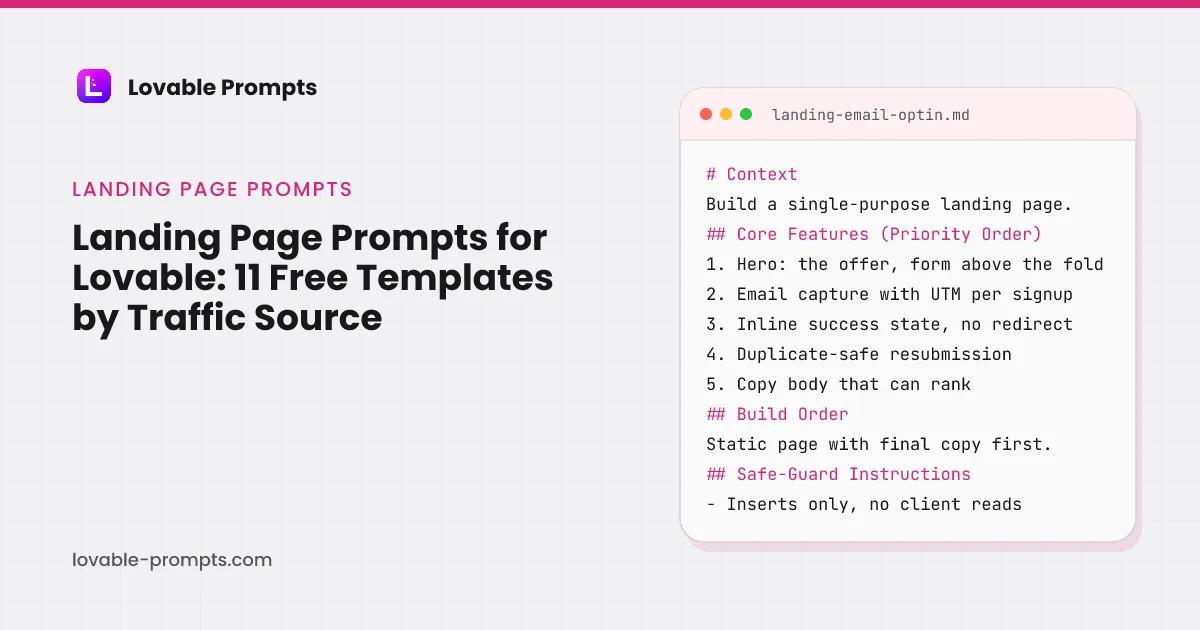
A landing page is the only part of a Lovable build where the copy is the product. Lovable will happily generate a hero, three feature cards and a footer from a one-line prompt, and the result looks finished while converting nothing, because nothing in that prompt said who the visitor is or what they were doing thirty seconds earlier.
The eleven prompts here all start from a traffic source rather than a layout. A page that has to rank needs indexable copy and a substantive content body. A page behind a paid click needs the offer above the fold and one action. A waitlist page needs a reason to believe the thing will ship. Those are different pages, and prompting for a generic landing page gets you none of them. One of them, the email opt-in page, we have run unedited in a fresh Lovable project and measured; the screenshots and the credit count are below.
Landing Page + Email Opt-In
What this prompt is for
A landing page whose only job is the email: one offer, one form, duplicate-safe capture, and a copy body that can actually rank.
When to use it
Collecting interest before a launch, or converting a traffic source you already have. If the page has two goals, it has none; split them.
# Context
Build a single-purpose landing page: capture an email address before a product launches. The visitor arrives from one known traffic source, so the page carries one offer and one action, and nothing that competes with them.

## Core Features (Priority Order)
1. Hero: the offer in one sentence, the form visible without scrolling
2. Email capture writing to Supabase with UTM parameters stor
Channel-Optimized Pro Version
This prompt has a Pro version optimized for Organic SEO. Unlock to get product-channel fit guidance and distribution-ready features.
Event Countdown Landing Page
What this prompt is for
An event page with a countdown that means something: time-zone-correct, capture before, and an honest state change when the moment passes.
When to use it
A launch, webinar or drop with a fixed date. If the date can slip, use a waitlist page instead; a countdown that resets destroys trust instantly.
# Context
Build a landing page for a dated event: a countdown to one canonical moment, email capture for reminders, and a defined transformation of the page when the countdown reaches zero.

## Core Features (Priority Order)
1. Countdown from a single UTC timestamp, rendered in the visitor's local time zone with the zone named
2. Email capture: 'remind me', storing the address with UTM parameters
Channel-Optimized Pro Version
This prompt has a Pro version optimized for Organic Socials. Unlock to get product-channel fit guidance and distribution-ready features.
Landing Page A/B Variant Generator
What this prompt is for
Landing page variants done safely: shared components, one differing block per variant, stable assignment, and measurement wired before traffic splits.
When to use it
Only after a page has traffic and a baseline. Testing on a page with 30 visits a week produces noise dressed as insight; fix distribution first.
# Context
An existing landing page converts at a known baseline. Build variant testing: serve visitors one of two versions differing in exactly one element, keep the assignment stable per visitor, and measure conversion per variant from the first impression.

## Core Features (Priority Order)
1. Variant definition: one changed block (hero promise, CTA wording, or proof section), everything else sh
Channel-Optimized Pro Version
This prompt has a Pro version optimized for Paid Search. Unlock to get product-channel fit guidance and distribution-ready features.
Basic Analytics for Landing Pages
What this prompt is for
First-party page analytics that answer five questions: visits, sources, device, conversion, and where visitors gave up, without a third-party script.
When to use it
Before driving any traffic to a page you care about. Changing a page without a baseline is guessing with extra steps.
# Context
Add first-party analytics to a landing page: enough to know traffic, source, device, conversion and drop-off, collected by your own endpoint, readable on one internal dashboard. No external analytics script.

## Core Features (Priority Order)
1. Pageview capture: path, referrer, UTM parameters, device class, timestamp
2. Conversion event tied to the page's one goal (form submit)
3. A dai
Channel-Optimized Pro Version
This prompt has a Pro version optimized for Organic SEO. Unlock to get product-channel fit guidance and distribution-ready features.
Simple Sitemap & SEO Generator
What this prompt is for
The indexability layer for a generated site: sitemap, canonicals, titles, robots and structured data, derived from routes so they cannot drift.
When to use it
The moment a project has public pages meant to be found. Retrofitting canonicals after URLs circulate is how duplicate-content problems become permanent.
# Context
A generated site has public pages that should rank. Build the indexability layer: sitemap.xml, per-page canonicals and titles, robots.txt, and basic structured data, all derived from the route list so nothing can drift.

## Core Features (Priority Order)
1. One route registry: path, title, description, indexable flag, content date
2. sitemap.xml generated from the registry, indexable rou
Channel-Optimized Pro Version
This prompt has a Pro version optimized for Organic SEO. Unlock to get product-channel fit guidance and distribution-ready features.
Simple Press Kit Page
What this prompt is for
A press page journalists can use at midnight on deadline: facts, approved quotes, downloadable assets, and a contact that answers.
When to use it
Before outreach, before a launch window, or the first time a writer asks 'do you have a press kit'. After the article went to print is too late.
# Context
Build a press and media page: everything a journalist needs to write about the company accurately without waiting for a reply. Facts, quotes, assets, contact, all current and all downloadable.

## Core Features (Priority Order)
1. Fact block: what the product is in one sentence, founded date, founder names, location, one-line traction statement with its as-of date
2. Approved quotes: two
Channel-Optimized Pro Version
This prompt has a Pro version optimized for Organic SEO. Unlock to get product-channel fit guidance and distribution-ready features.
SEO Content Landing Page Generator
What this prompt is for
A long-form landing page built to rank for one query: intent-matched structure, genuine depth, FAQ schema, and a conversion path that fits the reading flow.
When to use it
When one search query matters enough to deserve its own page and the current results are beatable. One page per intent; a page chasing two queries ranks for neither.
# Context
Build a landing page targeting one search query. The searcher's intent defines the structure; the page answers it thoroughly enough to deserve the ranking, then converts attention it has earned. Server-rendered throughout.

## Core Features (Priority Order)
1. An H1 and title matched to the query's actual intent, not just its words
2. The direct answer within the first 150 words, before
Channel-Optimized Pro Version
This prompt has a Pro version optimized for Organic SEO. Unlock to get product-channel fit guidance and distribution-ready features.
Lead Magnet Download Page
What this prompt is for
A gated download page that respects the trade: clear preview of the asset, email for access, instant delivery, and a follow-up that was disclosed up front.
When to use it
When you have an asset genuinely worth an email address. If the PDF is a blog post with a cover, ungate it and let it earn links instead.
# Context
Build a gated download page for one asset (guide, checklist, template pack): the visitor sees what they get, trades an email, receives it instantly, and knows exactly what follows. The gate is a fair trade, not a trap.

## Core Features (Priority Order)
1. Asset preview: table of contents or sample pages, page count, format, last-updated date
2. Capture form: email only, with a disclosur
Channel-Optimized Pro Version
This prompt has a Pro version optimized for Organic SEO. Unlock to get product-channel fit guidance and distribution-ready features.
Pricing Page with Tier Comparison
What this prompt is for
A pricing page that answers the buying questions in order: plans, the differences that matter, the objections, and one honest recommendation.
When to use it
The moment anything is purchasable. A checkout without a pricing page that answers objections is a form with a bounce rate.
# Context
Build a pricing page for two or three plans: what each costs, what genuinely differs, which one fits whom, and answers to the questions that stall purchases. Every number on it must match what the product enforces.

## Core Features (Priority Order)
1. Plan cards: price, billing unit, the three differences that matter, one CTA each
2. A recommendation with a reason ('most solo builders sChannel-Optimized Pro Version
This prompt has a Pro version optimized for Organic SEO. Unlock to get product-channel fit guidance and distribution-ready features.
Testimonial & Social Proof Page
What this prompt is for
A proof page with chain of custody: verified quotes with permission, results with context, and layout that makes verification easy rather than hoped-against.
When to use it
Once you have genuine customer results worth showing. Before that, ship the product pages; a proof page with placeholder names is a liability generator.
# Context
Build a social-proof page assembling verifiable customer evidence: quotes, results and logos, each with provenance. This page's entire value is credibility, so its design constraint is verifiability, not volume.

## Core Features (Priority Order)
1. Featured quotes: full name, role, company, photo where permitted, each with permission on record
2. Result statements with context: what cha
Channel-Optimized Pro Version
This prompt has a Pro version optimized for Organic SEO. Unlock to get product-channel fit guidance and distribution-ready features.
Waitlist Signup Page
What this prompt is for
A waitlist page that tells the truth: what is coming, what joining gets you, position feedback, and a list stored where browsers cannot read it.
When to use it
Pre-launch, when the product is concrete enough to describe honestly but not ready to sell. If launch is over 90 days out, expect the list to cool; plan the cadence.
# Context
Build a waitlist page for a pre-launch product: explain what is coming and when, capture emails with source attribution, confirm honestly, and keep the list unreadable from the client. Clarity converts here; vagueness reads as vapor.

## Core Features (Priority Order)
1. Hero: what the product is in one concrete sentence, and the expected launch window
2. What joining gets you: early acc
Channel-Optimized Pro Version
This prompt has a Pro version optimized for Organic Socials. Unlock to get product-channel fit guidance and distribution-ready features.
Every Prompt, Every Kit, One Payment
All 11 prompts plus every Pro variant and build kit in one bundle, plus unlimited prompt generation, $199 once. Or sign up free to copy prompts one at a time.
Browse More Categories
Related Resources
The Complete Lovable Bundle
$199 once. Unlimited generation, every prompt, every kit, every future dropEvery prompt, every Pro variant, all four build kits and every future drop, in one Notion workspace. One payment, never a subscription.
Get the 151-Prompt BundleWhich growth channels do these prompts serve?
Every prompt in this category carries a distribution section naming the channel it is built for, so the generated app has a way of being found rather than only a feature set. The chart counts primary and secondary coverage together, computed from the prompt bodies when the site is built.
| Category | prompts |
|---|---|
| Organic SEO / AI Search | 9 |
| Organic Socials | 3 |
| B2B Sales / LinkedIn | 3 |
| Email Marketing | 3 |
| Paid Search | 2 |
| Community-led Growth | 2 |
Computed from the channel mapping in each prompt at build time; a prompt can serve more than one channel.
What is a landing page prompt for Lovable, and why does it start with the traffic source?
A landing page prompt for Lovable is a Build mode message that specifies one page with one job: the visitor it is for, the single action it asks for, how that action is captured and stored, and how the page will be found. Lovable's prompting best practices say a good prompt states "what to build, where it goes, and what must stay untouched" (read on 26 September 2026); on a landing page the first of those is decided by where the traffic comes from, which is why every prompt on this page names a channel before it names a section.
The generic version fails on the capture, not the layout. Most prompts for landing pages, including the ones that rank for this search, ask an AI to write sections and leave the form as a placeholder. In Lovable the form is the product: it has to write to a database table that the browser can insert into but never read, store the source and campaign of each signup, confirm inline, and handle the same address arriving twice. Every capture prompt here specifies exactly that, and the safe-guard that the signups table "forbids reads from the client, with no exceptions for debugging" is the line that turns a demo into a page you can send traffic to.
How is a landing page prompt in this library built?
The email opt-in prompt is the one to read first, because it is the second most upvoted prompt in the whole library and the one we have measured. Its sections, read from the prompt body, are below. Capture & Consent and Copy & Conversion are the two that a feature-level prompt never carries: the first pins the write path, the validation and the consent line; the second pins the one accent colour, the placeholder rule for proof, and the line length of the body copy.
- Context: One offer, one action, one known traffic source.
- Core Features (Priority Order): Hero and form first; copy body that can rank last.
- Capture & Consent: Server-side validation, UTMs per row, consent line.
- Copy & Conversion: One accent colour, no invented proof, 65-char lines.
- Build Order: Static copy first, so something exists to index.
- Safe-Guard Instructions: Insert-only table, no second CTA, keep typed input.
- Before Building: Lovable asks its questions, then saves the answers.
Headings read from the prompt body of landing-email-optin in this library.
Since 26 September 2026 every prompt in the library closes with a Before Building section that asks Lovable to put its questions first and save the answers to the project knowledge. Both halves come from Lovable's docs: the best-practices page recommends ending a prompt with "Ask me any questions you need in order to fully understand what I want from this feature and how I envision it", and the prompt library says to save decisions to project knowledge "so every later prompt builds on them automatically".
What happened when we ran the email opt-in prompt in Lovable?
On 31 July 2026 we pasted the Landing Page + Email Opt-In prompt, unedited, into a fresh Lovable project on the free plan. One round, no follow-up messages. The result had all five priority features: the offer and the form above the fold, a capture path writing to Lovable's Cloud backend, an inline success state that replaced the form after a test submission, duplicate handling, and a copy body below the fold with three FAQs. The run consumed 1.8 credits of the free plan's 5 daily, including the Cloud provisioning Lovable does on first use; the credit panel from that session is on the Lovable credits page.
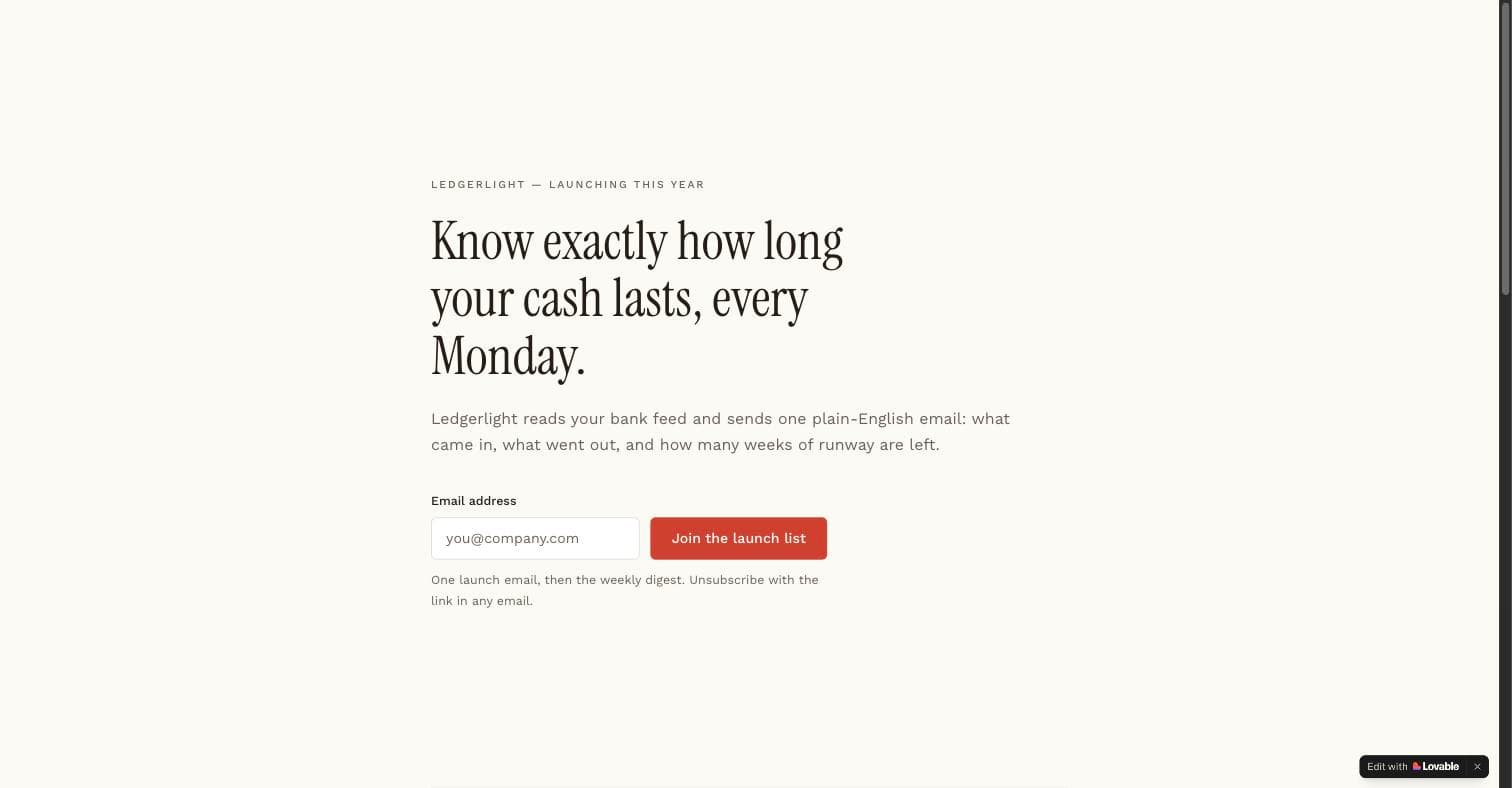
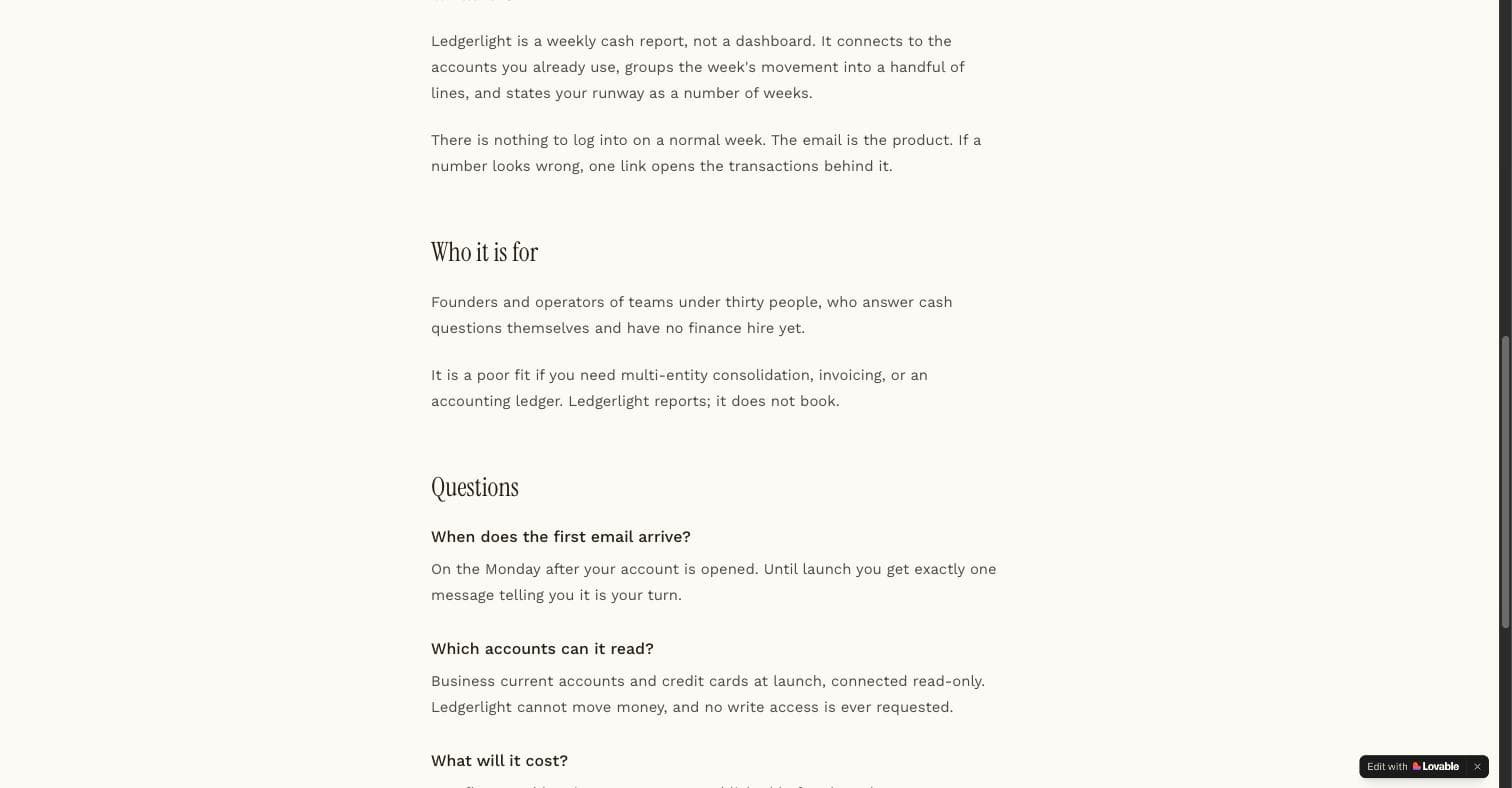
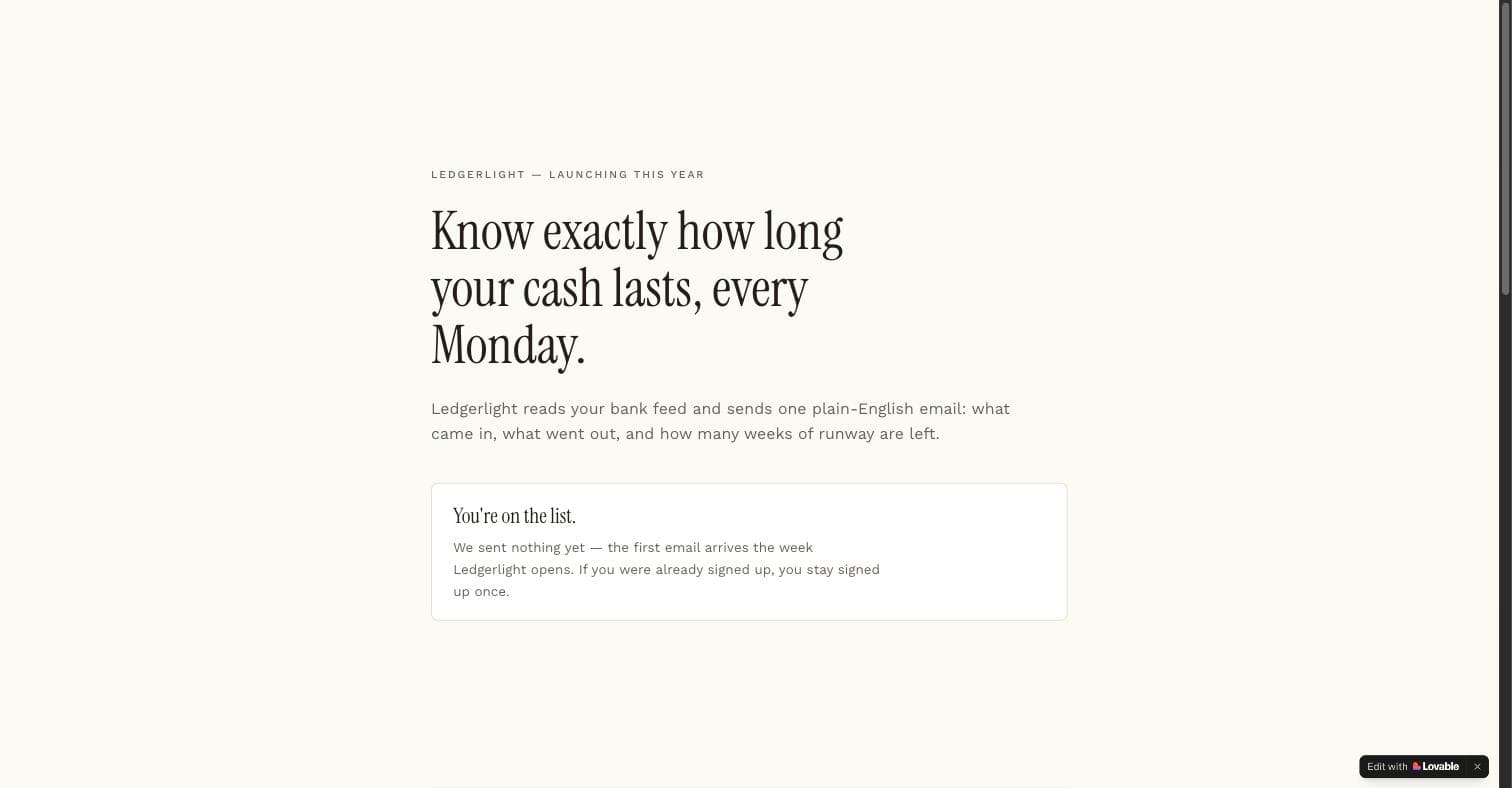
Two things the run showed that the prompt text alone would not. First, Lovable generated the consent line and the UTM columns without being asked twice, because they were listed under a heading rather than mentioned in prose. Second, the placeholder rule held: the proof elements came back marked as placeholders rather than as invented names, which is the failure mode this prompt was written to prevent.
Will a landing page built in Lovable rank in Google?
Yes, with two conditions that Lovable's own SEO and AI search documentation states plainly (read on 26 September 2026). The page has to be published: only "publicly published" apps are indexable, and workspace preview URLs are "never indexable". And the rendering depends on when the project was created: apps created from 13 May 2026 "use TanStack Start with server-side rendering", while older React + Vite apps use "on-request pre-rendering" that is "served only to verified search and AI crawlers", which is why a third-party SEO scanner still sees a single-page app on an older project.
- Build the page: copy body first
- Add indexability: sitemap prompt
- Publish: previews never index
- Run SEO review: fix what it flags
- Custom domain: then Search Console
Sequence from Lovable's SEO and AI search documentation (publishing, rendering, the in-editor review, Search Console integration), read on 26 September 2026, applied to the prompts on this page.
The same page describes an SEO and AI search review inside the editor that checks metadata, Open Graph tags, structured data, indexing tags and the sitemap, with a "Try to fix" action, plus Semrush-powered keyword research that Lovable says is free through 30 November 2026. The flow below is how the prompts here fit around it: the SEO content page and the sitemap prompt produce the on-page half, publishing makes it indexable, and the review is the check that counts, because on older projects a plain fetch of the page will not show what crawlers receive.
How do these differ from the AI landing page prompt lists that rank for this search?
The top results for "landing page prompts" on 26 September 2026 were lists of copywriting prompts for ChatGPT-style tools: seven to nineteen templates with placeholders such as [PRODUCT TYPE] and [COLOR1], a hero prompt, a features prompt, a pricing prompt, a CTA prompt, and a section on layering them. They are useful for the words on the page. None of them tells Lovable how to store an email, what to do when the same address arrives twice, how the page gets indexed, or what it costs to run, and none of them shows a page that was built from the prompt.
| Generic AI landing page prompt lists | Landing page prompts on this page | |
|---|---|---|
| What the prompt produces | Section copy with placeholders to fill | A working page with capture, states and copy body |
| Email capture | A form is assumed | Insert-only table, UTM columns, duplicate handling, consent line |
| Indexability | Not covered | Copy body that can rank; a sitemap and canonical prompt in the same category |
| Traffic source | Not specified | Named first; the page is shaped by it |
| Evidence | No generated page shown | One prompt run unedited, screenshots above, 1.8 credits measured |
| Best for | Rewriting the words on a live page | Building the page and its capture path |
The prompts on this page are the other half of that job. Where a copy prompt ends at the section text, these start at the capture path and the traffic source, and they carry a build order so the static copy exists before the form and the analytics are wired. Use a copy prompt to sharpen the headline once the page is live and measured; use one of these to make the page exist.
What does Lovable require for the emails and payments a landing page sends?
Two plan rules from Lovable's prompt library page matter here. "App emails require a paid plan and a verified email domain", so the confirmation email in the waitlist prompt and the asset delivery email in the lead magnet prompt need both before they send; the prompts deliver on the thank-you state first and treat the email as the second copy. And "built-in payments require a Pro plan or higher", which the pricing page prompt inherits the moment a plan card's button does more than open a form.
Lovable's own library also has a one-line prompt for the last step, "Change my site title, write a new meta description, and generate a new social sharing image", which is worth running after any page here goes live; it covers the share preview that the social share prompt in the UI category treats as the product.
Which Landing Page prompts do builders upvote most?
Every card on this page carries an upvote, one per visitor, and the cards are sorted by it. The counts below are read from the database when the page is rendered and refresh hourly, so they can lag a card by a vote or two. They are the first thing we look at when deciding which prompt in a category to extend.
| Category | upvotes |
|---|---|
| Landing Page + Email Opt-In | 21 |
| Event Countdown Landing Page | 11 |
| Landing Page A/B Variant Generator | 6 |
| Simple Sitemap & SEO Generator | 3 |
| Simple Press Kit Page | 2 |
| Waitlist Signup Page | 2 |
Upvotes recorded on lovable-prompts.com since January 2026 for this category, 49 in total, one vote per visitor. Read from the database at render time.
Which landing page prompt to use
Pick by what happens immediately after the click, not by industry. If you are collecting addresses before a launch, Waitlist Signup Page and Landing Page + Email Opt-In cover the two variants worth building. If the page has to earn its own traffic, SEO Content Landing Page Generator and Simple Sitemap & SEO Generator handle the parts Lovable skips by default.
If you already have traffic and a conversion problem, Landing Page A/B Variant Generator and Pricing Page with Tier Comparison change what the visitor decides. Testimonial & Social Proof Page and Simple Press Kit Page are for when the objection is trust rather than clarity.
Suggested build order
Building in this order avoids the usual rework, where analytics and SEO get retrofitted onto a page whose markup cannot support either. It is also the order Lovable's idea-to-app guide recommends for any product: keep the first version to one user, one action, one outcome, then add the backend when data has to survive a refresh.
Start with the page and the capture together
Building the form after the layout is what produces a hero section with nowhere for the address to go.
Prompt: Landing Page + Email Opt-In
Instrument before you drive traffic
You need the baseline conversion rate before the first variant, or the A/B test has nothing to compare against.
Prompt: Basic Analytics for Landing Pages
Make it indexable
Canonicals, titles and a sitemap. Cheap now, and expensive to add once pages exist at URLs you have already shared. Then publish and run Lovable's SEO review.
Prompt: Simple Sitemap & SEO Generator
Then test the offer
Variants are worth generating only once traffic and measurement are both in place.
Prompt: Landing Page A/B Variant Generator
Where landing page prompts usually go wrong
- Asking for a modern, clean design. Both words are invisible to the model as instructions. Name the components and the spacing rule instead, which is why every prompt here specifies shadcn/ui components rather than adjectives.
- Letting Lovable invent the social proof. It will generate plausible testimonials and logo strips, and they will be fabricated. Give it placeholders you intend to replace, and treat any generated name or number as a bug.
- Building six sections before the offer is decided. The page structure is downstream of the offer, so a prompt that specifies both at once produces a page you have to rebuild.
- Checking indexability by fetching the page yourself. On a Lovable project created before 13 May 2026 the pre-rendered version is served only to verified crawlers, so your own fetch shows the single-page app. Use the SEO and AI search review in the editor, then Search Console.
Frequently asked
Are these Lovable landing page templates or prompts?↓
Prompts. Each one is the instruction you paste into Lovable, which then generates the page in your own project with your stack and your styling. That is deliberately different from a downloadable template: you get a page that fits the app you are already building rather than one you have to retrofit.
Can I use these for a landing page that needs to rank in Google?↓
Yes, and two of the eleven exist specifically for that. SEO Content Landing Page Generator produces a page with a substantive content body rather than a hero and a form, and Simple Sitemap & SEO Generator adds the canonical, title and sitemap handling that Lovable does not generate unless asked. Publish the app, because Lovable's docs say only published apps are indexable, then run the SEO and AI search review in the editor.
How many credits does a landing page prompt cost?↓
Lovable does not publish a per-prompt figure and says Build mode is usage-based. Our one measurement: the email opt-in prompt, pasted unedited into a fresh free-plan project on 31 July 2026, consumed 1.8 credits in one round including Cloud provisioning. Larger pages with images cost more; the credits page on this site covers what Lovable's docs say about the spread.
Can the page send the confirmation or download email itself?↓
Only on a paid plan with a verified email domain, per Lovable's prompt library page. The waitlist and lead magnet prompts here confirm on the page first and treat the email as a second copy, so the page works before the email is set up.
Do I need the Pro version of a prompt?↓
The free version builds the page. The Pro version adds the distribution mechanics for a specific channel, which is what makes the page reachable rather than merely live. If you have not decided how people will arrive, the free version is the right starting point.
How much should I change before pasting?↓
Replace the audience and the offer, always. Those two lines change which features Lovable prioritises more than anything else in the prompt. The structural sections can usually stay as written, and the closing Before Building section makes Lovable ask about anything it still needs.
Related reading
- the email opt-in prompt, run and measured
1.8 credits, one round, screenshots.
- how Lovable credits work
Build versus Run credits, from the docs.
- the landing page build kit
Prompt, insert-only schema and verification queries.
- getting the first 100 users
One channel, the matching playbook.
- SaaS prompts for what comes after the capture
Auth and roles once the list exists.
- UI prompts for the states a page needs
Empty, loading, error, named per screen.
- the mistakes that cost rebuild rounds
Invented proof is number five.
- Lovable vs Bolt
What each meter counts.
- Lovable SEO, measured on our own site
Pre-rendering, SSR and a before-and-after from Search Console.
- vibe coding prompts
The waitlist and paid-landing prompts in short form.
- Base44 prompts
The waitlist page as a locked entity.
- Lovable and Stripe
What a $29 sale costs on Stripe and on Paddle via Lovable.
- Lovable vs v0
Where a Next.js landing page from v0 differs from Lovable's.
- app ideas
Fifty ideas from the library, grouped by channel.
- SaaS landing page prompt
The SaaS landing page as a six-section prompt, run and checked.
- Product Hunt launch
Product Hunt's rules verbatim and the four launch-day pages.
- MVP examples
The July run as an MVP example, with the famous three sourced.
- prompt engineering examples
The SEO and lead-magnet safeguard edits as pairs.
- CRM app prompts
The public lead form that writes into a CRM, insert-only.
Sources
All checked on 26 September 2026.
Updated .
Written by

Marco Kohns
Founder of ProtoBites - Venture Growth Studio
Growth PM at a Silicon Valley scale-up (a16z and General Catalyst backed), ex-Techstars where he consulted 13 early-stage startups, Reforge-trained. Every prompt on this site comes out of shipping ProtoBites' own portfolio products.
Help shape this product
We're building this in public and your input genuinely matters.
If something felt confusing, missing, or especially useful, I'd love to hear about it. It takes ~30 seconds and helps me improve the parts that matter most.
Share quick feedbackGoes straight to the builder. No marketing questions. No auto-replies.