Run in Lovable 1.8 credits · 1 round, no questions askedFree planChecked

    Lovable landing page prompt: one offer, one form, every email saved

    Fill in three fields, copy the prompt, paste it into a new Lovable project. Unedited, it built a working opt-in page with stored, duplicate-safe sign-ups for 1.8 credits in one round.

    By Marco Kohns · Prompt written and run by us

    Make it yours

    One offer. Two offers halve the sign-ups you can attribute.
    How should Lovable decide the look?
    What we ran. For a landing page with no stated look, Lovable now shows up to 4 design questions first. They cost no extra credits.
    Keep these sections
    prompt · landing-email-optin · 298 words
    # ContextBuild a single-purpose landing page: capture an email address before a product launches. The visitor arrives from one known traffic source, so the page carries one offer and one action, and nothing that competes with them. ## Core Features (Priority Order)1. Hero: the offer in one sentence, the form visible without scrolling2. Email capture writing to Supabase with UTM parameters stored per signup3. Inline success state replacing the form, no redirect, no alert4. Duplicate handling: resubmitting the same address confirms instead of erroring5. A substantive copy body below the fold: what it is, who it is for, three concrete FAQs ## Capture & Consent- Client and server-side email validation; the server is the one that counts- Store source, utm_source, utm_medium, utm_campaign and referrer on every row- One-line consent text under the form stating what will be sent and how to leave ## Copy & Conversion- One accent color, used by the submit button and nothing else- Proof elements are placeholders clearly marked as placeholders; never invent names or numbers- Maximum 65 characters per line of body copy; generous vertical rhythm ## Build OrderStatic page with final copy first, so something exists to index. Then the form and write path with duplicate handling, then UTM capture, then analytics last. ## Safe-Guard Instructions- The signups table accepts inserts and forbids reads from the client, with no exceptions for debugging- No second call to action anywhere on the page- The form must not lose the typed address on a validation error ## Before BuildingAsk me any questions you need in order to fully understand the audience and the offer, then save the decisions to the project knowledge so later prompts build on them.

    Disclosure: if you create a Lovable account through links on this page, we may earn a commission. It costs you nothing and does not change what we recommend.

    Paste it into LovableUnedited, this prompt cost 1.8 credits in one round on the Free plan.

    Measured run

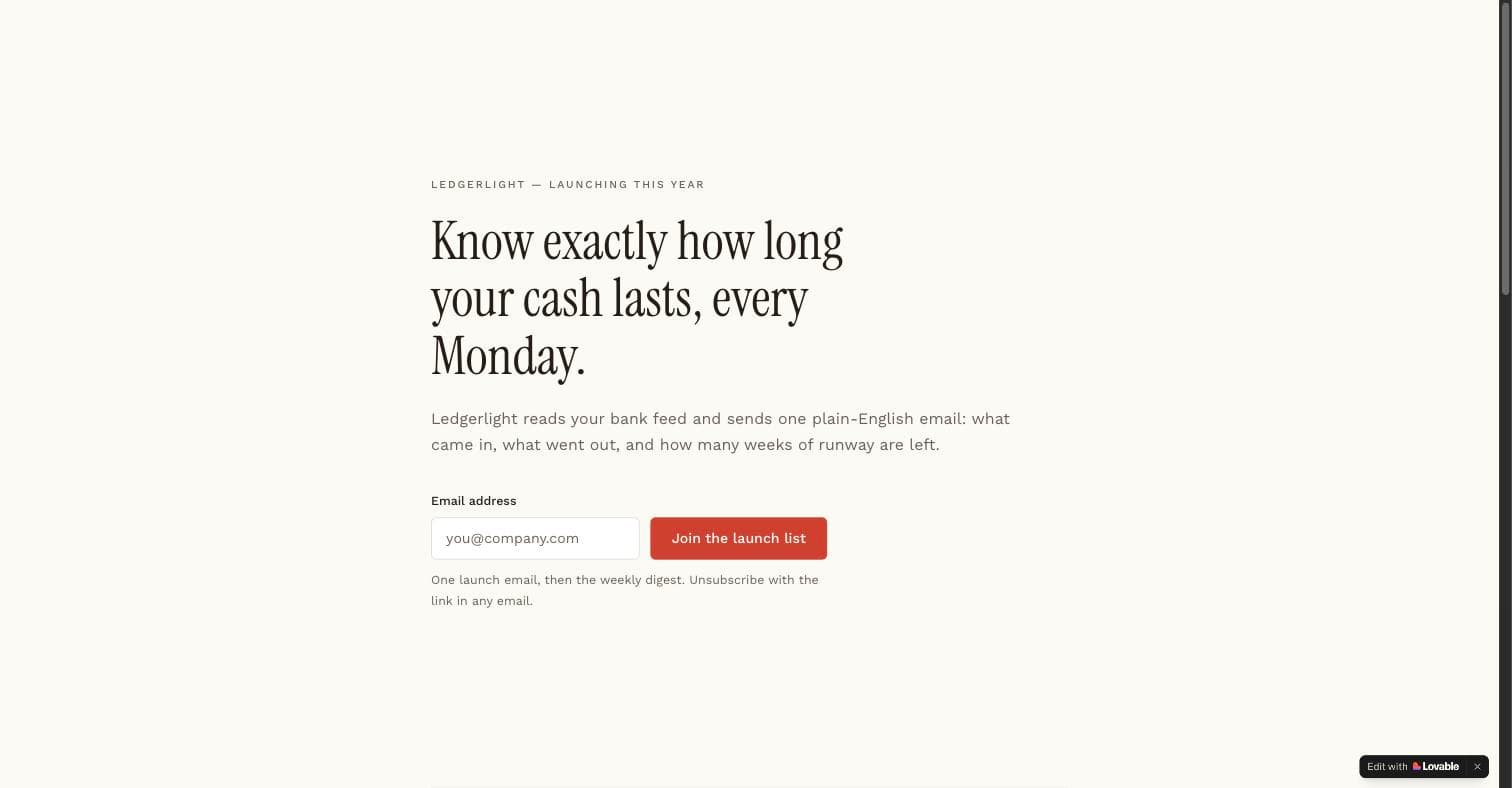
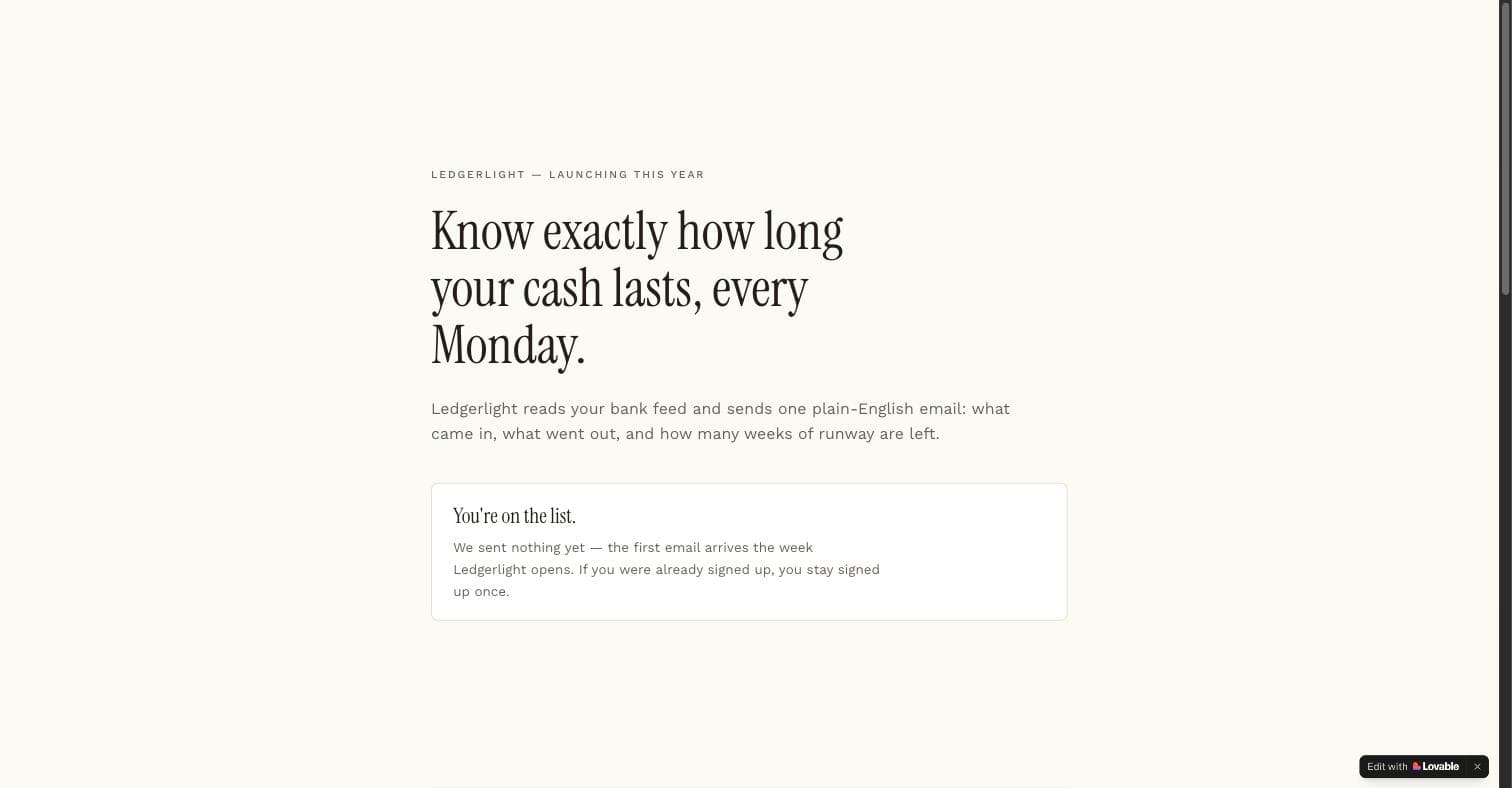
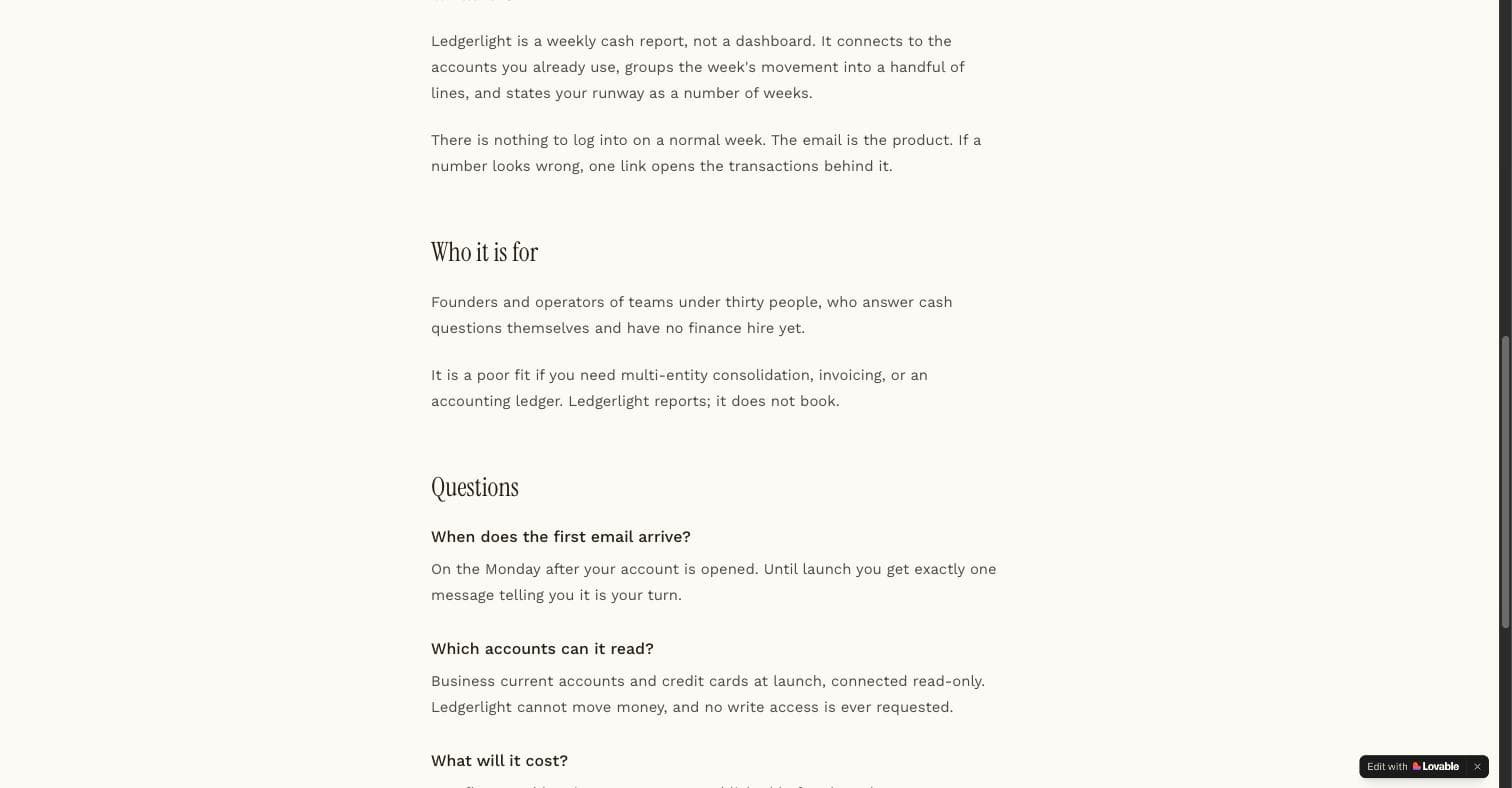
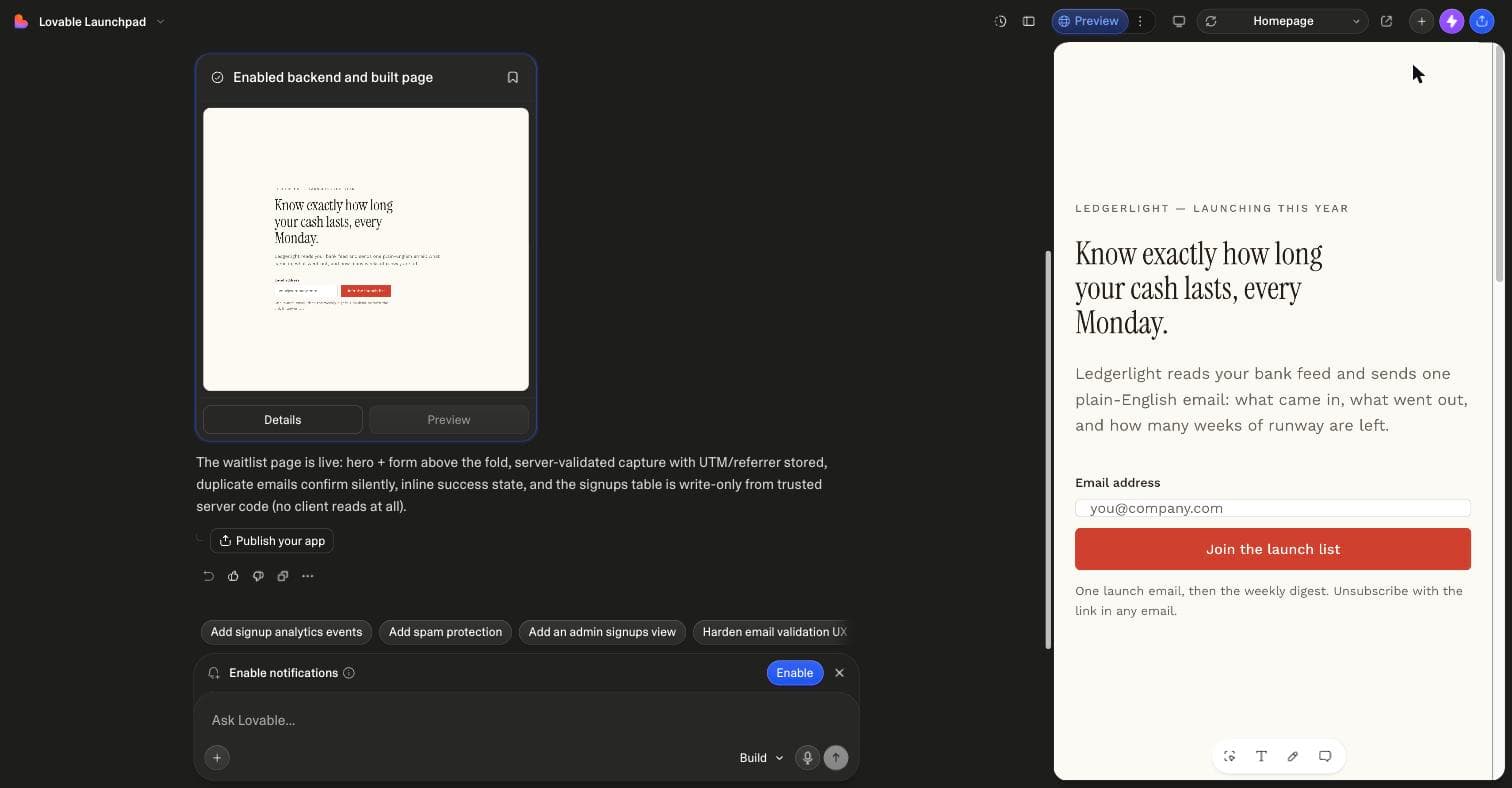
    What Lovable built from the unedited prompt

    Fresh Free-plan project, prompt pasted as is, no follow-up message. 31 July 2026.

    The Lovable editor after the run: a completion card titled Enabled backend and built page with a thumbnail of the generated page, the summary that the waitlist page is live with server-validated capture and a write-only signups table, and the preview on the right showing the headline, one email field and a Join the launch list button
    Lovable's completion card: backend enabled, signups table write-only
    Lovable preview of the generated email opt-in landing page: a one-sentence offer headline, a single email field with a submit button above the fold, and a short consent line under the form
    Offer and form above the fold, consent line under it
    Lovable preview after a test submission: the email form has been replaced inline by a confirmation message, with no redirect and no alert dialog
    The inline success state after a test submission
    Lovable preview of the same page below the fold: a what-it-is section, a who-it-is-for section and three FAQ entries in a single narrow column
    Below the fold: the copy body and the 3 FAQs

    Why each line is there

    Click a section to see what it prevents

    Lovable's design guidance says a landing page prompt that leaves the look open gets design questions first. This is what each section of ours does in practice, and what goes wrong when a line is missing.

    With it

    One page, one job, one known traffic source. Lovable wrote the headline for a launch list and added nothing that competes with the form.

    Without it

    Generic SaaS copy and a hero, three feature cards and a footer that look finished and convert nothing.

    Context
    With it: One page, one job, one known traffic source. Lovable wrote the headline for a launch list and added nothing that competes with the form. Without it: Generic SaaS copy and a hero, three feature cards and a footer that look finished and convert nothing.
    Core features
    With it: Five numbered pieces in priority order. All five were present on the first build, including the copy body that gives the page something to index. Without it: Sections in whatever order the model prefers, usually the form last and the copy body never.
    Capture & consent
    With it: Server-side validation, UTM and referrer columns, a consent line under the form. Lovable produced all three without being asked twice because they sat under their own heading. Without it: A form that looks right and writes nowhere, or asks for name, company and phone.
    Copy & conversion
    With it: One accent colour on the submit button and proof elements marked as placeholders. No invented names or numbers came back. Without it: Plausible testimonials and a logo strip you have to find and remove before anyone sees them.
    Build order
    With it: Static copy first, then the write path with duplicate handling, then UTM capture, then analytics. The page existed before the form did. Without it: Analytics and SEO retrofitted onto markup that cannot carry them.
    Safe-guards
    With it: An insert-only signups table the browser can never read, no second call to action, the typed address kept on a validation error. Without it: A table readable from the client, which Lovable's own docs call the most common way app data gets exposed.
    Before building
    With it: Lovable asks about the audience and the offer first and saves the answers to project knowledge. Added to every library prompt on 26 September 2026. Without it: Guesses where your context is missing. The July run had no such line and asked nothing, so the fields above are how you avoid the guess.

    After the first build

    The next four prompts, in order

    Each one is a follow-up message in the same project. None is measured yet, so the cost shows a question mark.

    1. 01credits ?

      Count where sign-ups come from

      Know which post or ad worked before you spend more on it. The UTM columns already exist.

      Add a private /stats page: sign-ups per day and per utm_source. Only I can see it.
      Basic analytics prompt →
    2. 02credits ?

      Make it findable

      Lovable creates a robots.txt with every project but not always a sitemap, per its SEO docs.

      Add a page title, meta description, canonical tag and a sitemap.xml entry for this page.
      Sitemap & SEO prompt →
    3. 03credits ?

      Confirm by email

      App emails need a paid plan and a verified domain, so the page confirms on screen first and the email is the second copy.

      After sign-up, send one plain confirmation email saying what they get and when. Keep the on-page confirmation.
      Waitlist prompt, which carries this path →
    4. 04credits ?

      Test one headline against another

      Only once traffic and the stats page exist. Before that, results are noise.

      Create variant B with a different headline only. Assign visitors 50/50 and keep it stable per visitor.
      A/B variant prompt →

    Launch checklist

    From preview to a page people can find

    0/7

    Ticks stay on this page while it is open. Steps and plan rules from Lovable's docs, read 23 October 2026.

    If it goes wrong

    Symptom, cause, the line to paste

    The form submits and nothing is saved

    Cause: the backend was not enabled, or the form is not wired to a table. In our run Lovable enabled it on its own because the prompt named the write path.

    Store each submission in a signups table on the built-in backend with email, source, UTM columns and created_at. Insert from server code only. Show me a test row.

    It added sections I did not ask for

    Cause: the one-job rule got lost after a later message.

    Remove every section except the hero, the form, the proof placeholders and the FAQs. Do not change the form or the table.

    Invented testimonials appeared

    Cause: a proof section with no placeholder rule, or the rule was removed in an edit.

    Replace all testimonials, logos and numbers with labelled empty slots: [Quote], [Name], [Role]. Do not invent names, companies or figures anywhere.

    The form is below the fold on a phone

    Cause: a tall hero or a long headline at 375 px.

    At 375 px wide the email form must be visible without scrolling. Shrink the hero, keep the copy, keep the consent line.

    Not quite your page?

    10 other Lovable landing page prompts

    Organic SocialsEvent Countdown Landing PageAn event page with a countdown that means something: time-zone-correct, capture before, and an honest state change when the moment passes.Paid SearchLanding Page A/B Variant GeneratorLanding page variants done safely: shared components, one differing block per variant, stable assignment, and measurement wired before traffic splits.Organic SEOBasic Analytics for Landing PagesFirst-party page analytics that answer five questions: visits, sources, device, conversion, and where visitors gave up, without a third-party script.Organic SEOSimple Sitemap & SEO GeneratorThe indexability layer for a generated site: sitemap, canonicals, titles, robots and structured data, derived from routes so they cannot drift.Organic SEOSimple Press Kit PageA press page journalists can use at midnight on deadline: facts, approved quotes, downloadable assets, and a contact that answers.Organic SEOSEO Content Landing Page GeneratorA long-form landing page built to rank for one query: intent-matched structure, genuine depth, FAQ schema, and a conversion path that fits the reading flow.Organic SEOLead Magnet Download PageA gated download page that respects the trade: clear preview of the asset, email for access, instant delivery, and a follow-up that was disclosed up front.Organic SEOPricing Page with Tier ComparisonA pricing page that answers the buying questions in order: plans, the differences that matter, the objections, and one honest recommendation.Organic SEOTestimonial & Social Proof PageA proof page with chain of custody: verified quotes with permission, results with context, and layout that makes verification easy instead of hoped for.Organic SocialsWaitlist Signup PageA waitlist page that tells the truth: what is coming, what joining gets you, position feedback, and a list stored where browsers cannot read it.

    Pro version · Organic SEO

    The same page, written to be found in search

    The Pro version adds the channel section: the copy body expanded server-rendered with an FAQ that answers what your audience searches, a canonical tag, a title written for the query, and a share moment after sign-up. Unlocked in the bundle, with every other prompt and kit.

    Questions about this prompt

    Does this work on the Free plan?

    Yes. Our run used a fresh Free-plan project and cost 1.8 credits, inside the 5 daily credits Free gets; the credits panel read 3.20 of 5 left afterwards. A custom domain needs a paid plan, per Lovable's docs.

    Where do the emails go?

    Into a signups table on Lovable's built-in backend, created on the first build. The prompt makes it write-only from server code, so the browser can never read the list. You export it from the database view or connect an email tool with a follow-up prompt.

    Will Lovable ask me design questions?

    Since Lovable added design guidance, a landing page with no stated look gets a question card with up to 4 questions on palette, typography and layout, each with up to 4 options, at no extra credit cost per the docs. Name your fonts and colours in the builder above, or connect a design system, and it builds straight away. Our July run predates the card and asked nothing.

    Should I build it in one prompt or section by section?

    Lovable's prompting guide says a full-page prompt gets you noise and a section-based prompt gets you signal. For a one-job opt-in page one message was enough: ours came back complete in one round because the prompt carries its own build order. Go section by section for a longer page with several offers.

    What does the Before Building line change?

    It makes Lovable ask about the audience and the offer first and save the answers to project knowledge, so later prompts in the same project build on them. It was added to every library prompt on 26 September 2026. The 1.8-credit run predates it; on the two runs since, that closing line produced 2 and 4 questions before any code.

    Can I connect my own domain?

    On a paid plan. Publish first, then either buy the domain in Lovable or add the A record to Lovable's edge and the TXT verification record at your DNS provider. Most changes go live within hours and the docs allow up to 72 hours. Then re-run the SEO and AI search review on the new domain.

    Who ran this

    Marco Kohns wrote the prompt and ran it on 31 July 2026 in his own Lovable workspace. The Pro version and the bundle are our own products. Lovable Prompts is independent and not affiliated with Lovable.

    What we have not tested yet

    • The duplicate-address state on screen. Lovable's completion report says it confirms silently; we did not screenshot a second submission.
    • The prompt as it reads today, with the Before Building line, which was added after this run.
    • Conversion. The run built a page; nobody sent traffic to it.
    • The built page on a custom domain.