
Advanced Lovable Prompting: Skills, Goals and Prompt Chains
Once a structured first prompt works, the next gains come from the parts of Lovable most builders never open: Skills you invoke with a slash, goal runs that keep working for hours, Plan mode for the fix that keeps failing, references to other projects and files, and refinement prompts chained onto a working build. This guide covers each one, quoted from Lovable's documentation, with the library's own chained prompts as the worked example.
Updated
What makes a Lovable prompt advanced?
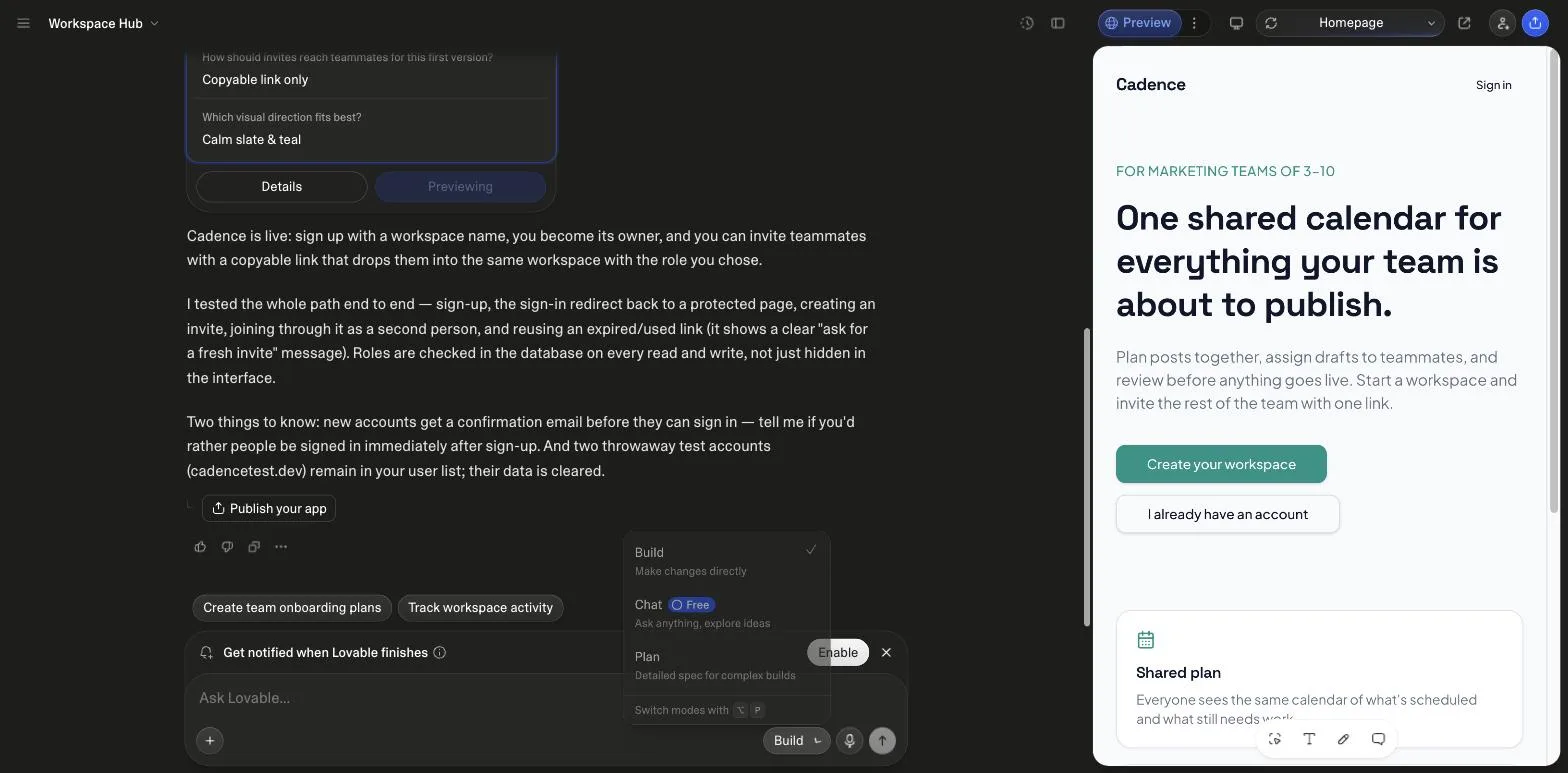
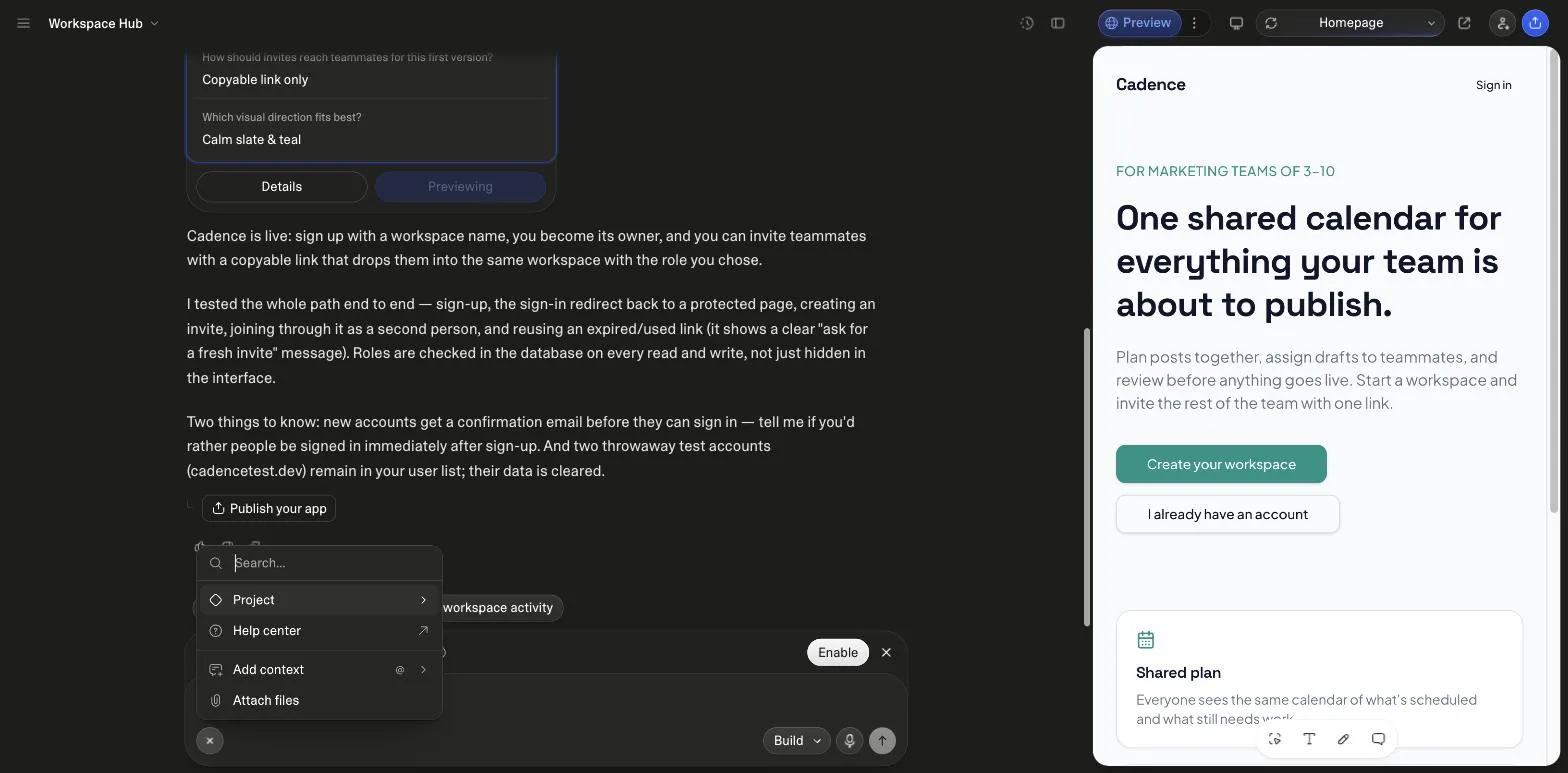
Not length. A first prompt on an empty project should already be structured, and the prompting guide covers that. Advanced prompting is using the controls Lovable puts around the chat box: the mode picker with Build, Chat and Plan; the slash menu with Skills and goals; the @ menu for project and file references; and the pattern of chaining a refinement prompt onto a build that works. All of it is documented by Lovable, and the descriptions on this page are quoted from those docs, read on 26 September 2026.
How do you chain prompts without breaking what already works?
By running the second prompt against the output of the first and saying what must stay untouched. Lovable's best-practices rule for a change prompt is what to build, where it goes and what must stay untouched, and its library page says to run one prompt at a time so every prompt builds on the app's current state. The library on this site applies that 151 times: every Pro variant ends with a numbered Refinement Prompts section written to run after the base build, 302 chained prompts in total, counted from the data.
| Category | refinement prompts |
|---|---|
| App Builder | 60 |
| API & Integration | 32 |
| Backend Logic | 30 |
| SaaS App | 30 |
| UI/UX | 28 |
| Landing Page | 22 |
| Claude Code | 20 |
| Cursor | 20 |
| Base44 | 20 |
| CRM App | 20 |
| Admin Dashboard | 20 |
Counted from the numbered Refinement Prompts lines in each Pro variant at build time, 302 across 151 prompts.
Here are the two that follow “SaaS MVP with User Auth”, verbatim. Each names the thing that already exists, the one change, and the rule that holds, which is the whole chaining technique in two lines.
- Refinement 1: “Invited users currently sign up cold. Pre-fill their email from the invite token and skip the workspace-creation step for them.”
- Refinement 2: “Add a soft seat limit: free workspaces cap at 5 members, with an upgrade prompt for the owner, enforced in the database, not only the UI.”
On the SaaS run on 26 September 2026, Lovable's own follow-up suggestions after the build were the same shape: “Create team onboarding plans” and “Track workspace activity”, one feature each, against a working foundation. The chain is the product; the first prompt is the seed.
When should you use a Skill, the knowledge file, or a goal?
Three different mechanisms for three different jobs, and Lovable's docs draw the lines. A Skill is a reusable workflow at workspace level with “a name, a description that tells Lovable when to use it, and markdown instructions that Lovable follows when the skill applies”; it applies automatically when a request matches or when you type a slash and pick it, it is shared with every project in the workspace, and it is available on all plans. The knowledge file is “always included in context” and suits universal rules. A goal, started with /goal, is a Build message Lovable keeps working on “until the goal is achieved”, for “up to 10 hours on the one message”, during which it “doesn't pause to ask questions about the work”.
| Skill | Knowledge | Goal | |
|---|---|---|---|
| What it is | A named, on-demand workflow in markdown | Persistent context read before every edit | A Build message that runs until done |
| When it applies | When the request matches its description, or via / | Always | When you type /goal |
| Scope | Workspace, shared with every project | Workspace or project, 10,000 characters each | One message, up to 10 hours |
| Asks questions | As the skill instructs | Not applicable | No, it makes routine decisions itself |
| Cost | The Build work it triggers | None | Billed on the work; noticeably more than a regular Build message |
| Fits | Checklists, release steps, content templates | Coding standards, personas, schema, constraints | A feature you can describe as done or not done |
The prompts on this site are written as the middle case: a structured Build message that asks its questions first. Turn one into a Skill when you find yourself pasting it into a third project, and into a goal only when you can state the finish line and are content not to be asked anything on the way.
How do you debug in Lovable when a fix keeps failing?
Lovable's debugging guide sets the order. First the Try to fix button, which comes with “10 free fixes” that reset every 24 hours. Then describe the bug rather than the frustration: what is broken, where, what you expected, what happened. Then, and this is the rule most people miss, switch modes: “repeated blind fixes tend to pile up code that hides the real problem. Switching to Plan mode after one or two failed attempts is usually faster than trying again.” Plan mode “investigates your project and writes a structured plan you can review, edit, and approve before any code is written” and costs “1 credit, plus the cost of any subagent research”. Last, revert: version history, or “Revert and resend” on a past message.
- Try to fix: 10 free per 24 hours
- Describe the bug: where, expected, actual
- Plan mode: after 1 to 2 misses
- Approve the plan: then Build applies it
- Revert and resend: if the path is wrong
Steps from Lovable's debugging guide and Plan mode documentation, read on 26 September 2026.
The debugging guide also publishes the prompts to use in Plan mode, and they are good ones to keep. Three of them, quoted:
- “What is the root cause of this build error? Show me the relevant code”
- “This error keeps coming back. Can we take a different approach?”
- “What solutions have we already tried for this error? List them”
How do you reference another project or a specific file?
With @. Lovable's cross-project referencing lets a prompt reuse “implementations across projects in your workspace, including code, assets, files, and chat history”; the example in the docs is “Use the logo and color palette from @BrandSite”. What can be pulled: components and layout systems, animations and styling, auth flows and API integrations, feature implementations, images and fonts, and relevant chat history. The limits, stated on the same page: workspace only, “all cross-project access is read-only”, restricted projects need explicit access, and a chat may hold up to 10 project references in one message.
Inside one project, the project chat docs say to type @ and pick a file from the code so “Lovable works on exactly that file”, which is the precise form of “what must stay untouched”: a refinement prompt that names the file it may change is a refinement prompt that cannot wander into the ones it may not.
What are meta prompting and reverse meta prompting?
Two patterns from Lovable's own Prompting Bible, the third and fourth of its four levels. Meta prompting is having the AI rewrite your prompt before you run it; the handbook's example is “Rewrite this prompt to be more concise and detailed” followed by a rough login-page request. Reverse meta prompting is the same move after a debugging session: “Summarize the errors we encountered while setting up JWT authentication and how they were resolved. Create a detailed prompt I can use next time.” The first sharpens the input; the second turns a painful hour into a reusable Skill-shaped artifact.
Both fit Chat mode, which the mode picker marks as free and the chat docs price at “typically a fraction of a credit” covered first by the daily chat allowance, because neither should touch code. The output of a reverse meta prompt is exactly what Lovable's Skills feature is built to store.
Where to go from here
Every category page in the library carries a suggested build order, which is the chaining pattern applied to that kind of app, and every Pro variant carries the refinement prompts counted above. The common mistakes guide prices the failures the debugging order above is designed to avoid, and the app builder guide walks through the editor these controls live in. If you also build with Claude Code, its slash commands and skills are the same idea on the other side of the terminal, covered in Claude Code commands.
Sources
All checked on 26 September 2026.
- Lovable docs: Define reusable instructions with skills
- Lovable docs: Set a goal for Lovable
- Lovable docs: Plan a change in Plan mode
- Lovable docs: Work with Lovable in the project chat
- Lovable docs: Cross-project referencing
- Lovable docs: Debug and improve your app
- Lovable docs: Define workspace and project knowledge
- Lovable blog: The Lovable Prompting Bible
What changed
- 26 September 2026: rebuilt around the features Lovable documents as advanced (Skills, goals, Plan and Chat modes, references, the debugging order, meta prompting), each quoted from the docs fetched that day; the library's refinement prompts counted and charted as the chaining example; two editor screenshots, a debugging flow, a Skills-knowledge-goals table, six FAQs, hero and sources; the page moved from a client component to a server-rendered one. The mock prompt chains of the earlier version are gone.
Frequently asked
What counts as an advanced Lovable prompt?↓
What is the difference between a Skill and the knowledge file?↓
What is a goal run and what does it cost?↓
How many refinement prompts does the library contain?↓
When should I switch from Build mode to Plan mode?↓
What is reverse meta prompting?↓
Related reading
- the prompting guide
Start here if the first prompt is not structured yet.
- Claude Code commands and skills
Slash commands on the CLI side.
- the SaaS prompts whose refinement prompts are quoted above
Fifteen chained briefs.
- app builder prompts
Thirty apps with a build order each.
- the mode picker and Chat actions menu
Screenshots of both.
- common mistakes, priced
What the debugging order avoids.
- Plan mode's price and the credit rules
One credit plus research.
- the prompting handbook
The workflow the chains sit inside.
- Cursor rules and Lovable knowledge, compared
Persistent instructions on the editor side.
- Claude Code subagents, and Lovable's
Research outside the main thread on both sides.
- coding prompts
Ten prompts from the vendors' own rules.
- AI app ideas
Fifteen AI prompts with the rule that keeps each honest.
- prompt engineering examples
Prompt edits paired with what they changed in the build.
Written by

Marco Kohns
Founder of ProtoBites - Venture Growth Studio
Growth PM at a Silicon Valley scale-up (a16z and General Catalyst backed), ex-Techstars where he consulted 13 early-stage startups, Reforge-trained. Every prompt on this site comes out of shipping ProtoBites' own portfolio products.