
How to Write Prompts for Lovable AI: The Prompting Guide
Lovable turns natural language into working applications, which means the prompt is the specification. This guide covers the structure Lovable responds to, why that structure is also the cheap way to build under Lovable's own pricing, a prompt from our library annotated line by line, and what happened when we pasted three of them in and counted the credits.
Updated
What does a good Lovable prompt contain?
Three things, in Lovable's own words: “what to build, where it goes, and what must stay untouched”. That is how its prompting best practices define a good change prompt (read on 26 September 2026), and the same page adds the two habits around it: build “in modular parts, not full pages at once”, and end a prompt with a line asking Lovable to ask you any questions it needs in order to fully understand what you want. Lovable's Academy page puts the same rules as headings: know what you are building before you build it, build one piece at a time, say exactly what you want and what you do not, and use your knowledge file.
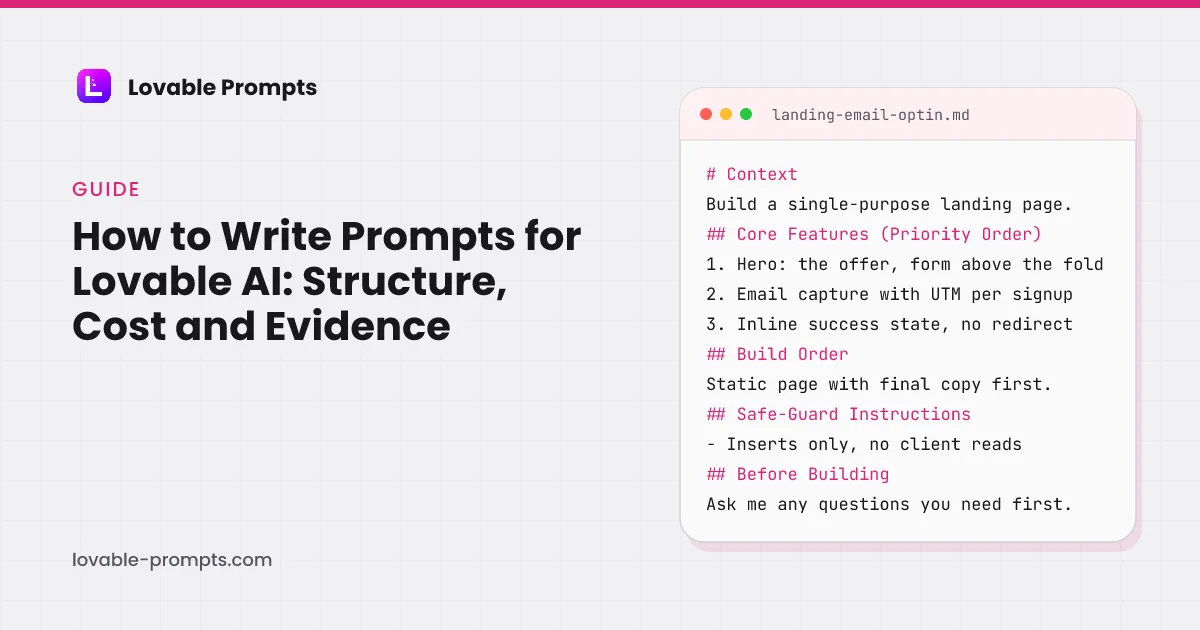
A first prompt on an empty project has no “where it goes” yet, so a whole-product prompt carries the same three parts in a different shape: the job and the user in a Context line, the features in priority order, and the rules that must hold after every later edit. Below is the skeleton of the email opt-in landing page prompt from our library, read from the prompt body itself. Every one of the 151 prompts in the library follows a skeleton like it.
- Context: The job, the visitor and the traffic source, in three sentences.
- Core Features (Priority Order): Numbered, so the first item exists before the fifth.
- Capture & Consent: The write path, validation and the consent line.
- Copy & Conversion: One accent colour, no invented proof, line length.
- Build Order: Static copy first, so something exists to index.
- Safe-Guard Instructions: What stays untouched; what never leaves the server.
- Before Building: Lovable asks its questions, then saves the answers.
Headings read from the prompt body of landing-email-optin in this library, 26 September 2026. The Before Building section was added to every prompt that day from Lovable's docs.
The last section is the newest. Lovable's prompt library page says to save decisions “to your project knowledge, so every later prompt builds on them automatically”, and its knowledge docs describe that file as up to 10,000 characters of purpose, personas, schema and constraints that Lovable reads before every edit. Asking the questions first and saving the answers is that rule, written into the prompt.
Why does structure beat prose, in Lovable's own pricing terms?
Two facts from Lovable's credits and usage documentation (read on 26 September 2026) decide how you should prompt. First, a Plan mode message costs “1 credit, plus the cost of any subagent research Lovable runs while planning”, and Plan mode never modifies code. Second, in Build mode “pricing is usage-based. Small, focused edits usually cost less than larger generations, multi-step changes, or requests that require more codebase exploration, verification, browser checks, web search, or image and video generation.”
Read those together and the conclusion writes itself: cost scales with how much Lovable has to figure out, not only with how much it writes. A vague paragraph makes the model explore, guess priority, and produce something you then correct, and every correction is another billable Build round. A structured prompt removes the guessing, which is why every prompt in our library uses the same section skeleton and why the question line at the end exists: a question costs a reply, a wrong build costs a round.
Two more lines from the same page matter for anyone on the free plan: it grants “5 daily build credits per day, up to 30 per calendar month”, and a stopped Build request is “charged based on the work completed so far” while one stopped before any change “is not charged”. Our landing-page run fits inside one free day; the two system-level runs below do not, and the numbers say by how much.
What are the seven sections of a library prompt, and why does each exist?
This is the skeleton our generator produces and the library prompts follow, one section per failure mode it prevents. The eighth, Before Building, closes every base prompt since 26 September 2026.
- # Context
- What the app is, who it is for, and the one job it has to do. Lovable builds the wrong thing most often when this is vague.
- ## Core Features (Priority Order)
- Numbered, so Lovable builds the load-bearing feature first instead of spreading effort evenly across everything you mentioned.
- ## Visual Style & Design
- Named shadcn/ui components and concrete spacing rules rather than adjectives like clean or modern.
- ## Technical Requirements
- Breakpoints, loading states, validation, and accessibility, stated up front so they are not retrofitted later.
- ## Implementation Strategy
- The build order. This is what stops Lovable from generating a UI it cannot wire up.
- ## Safe-Guard Instructions
- Constraints that survive later edits, so iterating on one screen does not quietly break another.
- ## Growth Features (Required for Distribution)
- The section no other prompt tool writes: the mechanics that make the finished app reachable through the channel you picked.
- ## Before Building
- Lovable's own recommendation, written in: ask any questions needed to understand the audience and the offer, then save the decisions to the project knowledge so later prompts build on them.
What does a library prompt look like, line by line?
This is the opening of “Landing Page + Email Opt-In” from the library, verbatim, followed by why each choice is there. Nothing below is a mock example written for this article, and it is the prompt we ran first.
# Context
Build a single-purpose landing page: capture an email address before a product launches. The visitor arrives from one known traffic source, so the page carries one offer and one action, and nothing that competes with them.

## Core Features (Priority Order)
1. Hero: the offer in one sentence, the form visible without scrolling
2. Email capture writing to Supabase with UTM parameters stored per signup
3. Inline success state replacing the form, no redirect, no alert
4. Duplicate handling: resubmitting the same address confirms instead of erroring
5. A substantive copy body below the fold: what it is, who it is for, three concrete FAQs

## Capture & Consent
- Client and server-side email validation; the server is the one that counts
- Store source, utm_source, utm_medium, utm_campaign and referrer on every row
- One-line consent text under the form stating what will be sent and how to leave| Why it is written that way | |
|---|---|
| The traffic source in line one | The visitor arrives from one known source, so the page carries one offer and one action. Lovable weighs early context heavily; the first sentence decides what gets built carefully versus incidentally. |
| Numbered Core Features | Priority is explicit. If credits run short or attention drifts, items 1 and 2 exist before item 5, instead of five half-built features. |
| Supabase named as the write path | Without a named destination, Lovable happily builds a form with nowhere for the address to go. Naming it forces the write path to exist; on our run it enabled Lovable Cloud for it unprompted. |
| Capture & Consent as its own section | Validation, the UTM columns and the consent line are the parts a form loses first. Listed under a heading rather than mentioned in prose, all three came back in one round. |
The full prompt, including the copy rules, build order, safe-guards and the closing question line, is free in the library.
What happened when we pasted three library prompts into Lovable?
Three prompts, three fresh projects, all in Marco's own Lovable workspace, each pasted unedited in Build mode and each costed by reading the workspace credits page before and after. The landing page in July came back in one round. The two runs on 26 September 2026 were the first with the Before Building line, and both made Lovable stop and ask before it built: two questions for the states system (who uses the app, which screen gets the states first), four for the SaaS foundation (who the team is, how the workspace is named, how invites travel, which of three visual directions). Both builds then matched the rules in the prompt, and on the SaaS run Lovable asked permission to sign in as a throwaway invited teammate to test the join flow before reporting that roles were checked in the database on every read and write.
| Category | credits |
|---|---|
| Landing page + email opt-in | 1.8 (no question line yet) |
| Empty states and skeletons | 9.5 (2 questions first) |
| SaaS MVP with user auth | 10.4 (4 questions first) |
Read from the Lovable workspace credits page on each run's date (2026-07-31, 2026-09-26, 2026-09-26), Cloud provisioning included where it happened; daily build credits count because they are spent first. Data in src/data/runs.ts.
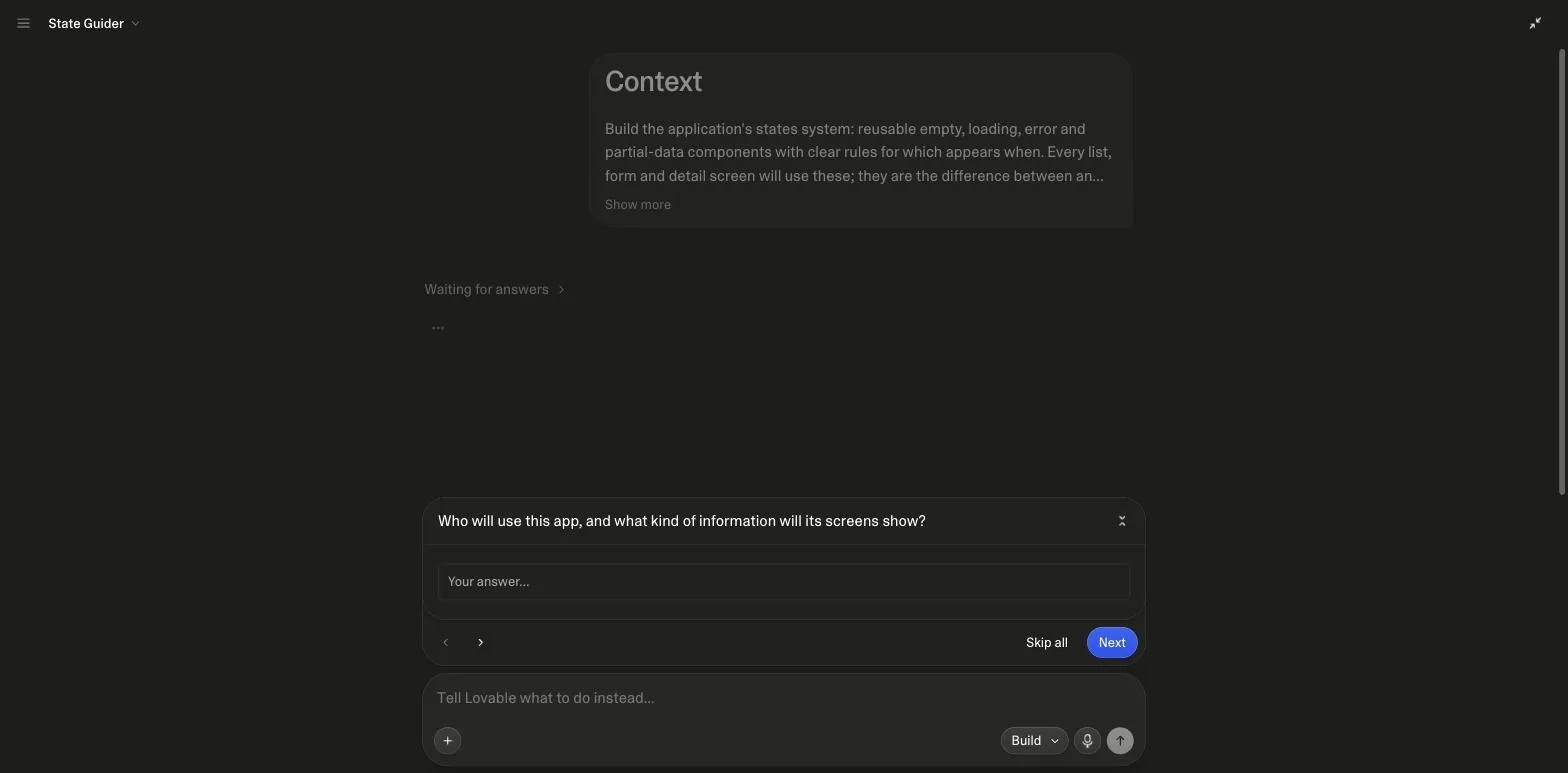
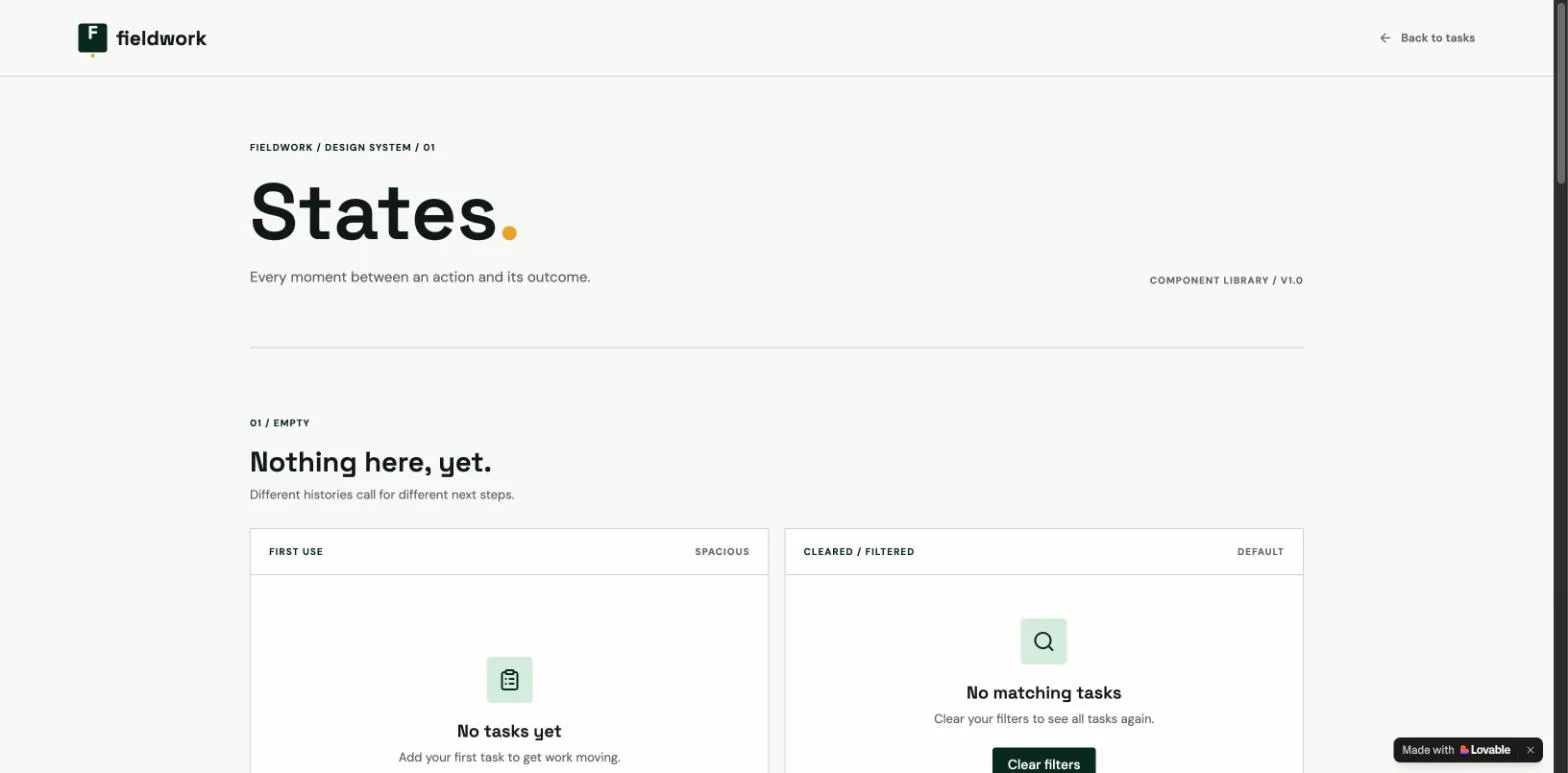
The spread is the lesson. A single page with one write path cost under two credits; a states system and a SaaS foundation that each provision a backend, and in one case test their own invite flow, cost about ten. Neither figure is a Lovable price list, both are what a structured prompt spent on a given day, and the per-run screenshots are on the UI prompts, SaaS prompts and landing page prompts pages.
How do you prompt progressively without paying for rework?
One prompt does not build a finished product, and trying makes the first generation worse. The rhythm that holds up matches how Lovable prices its modes and what its idea-to-app guide recommends: one change per prompt, split anything that uses “and” more than twice, and switch to Plan mode after two or three failed fixes rather than repeating the request.
- Structured prompt: foundation, in Build mode
- Answer questions: then let it build
- Check one path: read, then write
- Scoped requests: name the component
- Plan mode fix: after 2 to 3 misses
Sequence from Lovable's prompting best practices, credits and usage and idea-to-app documentation, read on 26 September 2026.
Issue one structured Build prompt for the foundation
The skeleton above, scoped to the core loop: one read path and one write path working end to end beats six screens of placeholders. Let the closing line do the planning; on our runs the questions Lovable asked were exactly the ones a vague prompt would have guessed at.
Extend with scoped, specific requests
Name the screen or component you are changing and say what must stay untouched. Lovable bills partly for how much codebase it reads, so “add sorting to the members table” is cheaper than “improve the dashboard”.
Correct the miss, never restate the feature
When a generation is 80% right, describe the 20% that is wrong. Restating the whole feature triggers a large regeneration and risks breaking the 80% that worked.
Investigate in Plan mode when a fix keeps failing
One credit plus any research it runs, no code touched until you approve the plan. Lovable's guide says to switch after two or three failed fixes; that is cheaper than a fourth Build attempt.
Which prompt patterns fail, and what should you write instead?
| What happens | Write instead | |
|---|---|---|
| “Build me a modern, clean dashboard” | Adjectives carry no instruction. Lovable picks defaults and you pay a second round to change them, or it shows you three design directions to choose from first. | Name components and values: shadcn Card and Table, a 4px spacing grid, 8px corners, one accent colour for primary actions. A committed visual line skips the three-way picker. |
| The whole app in one prompt | Everything arrives half-built, and fixing it costs more than staging it would have. | Foundation first, then features by priority. Our library sequences every category this way. |
| No empty, loading or error states | The happy path works in the demo and breaks the first time a list is empty. | One line: “include empty, loading and error states for every list and form”, or the states prompt from the UI category, which defines them once for the whole app. |
| No question line at the end | Lovable fills the gaps with guesses about who the user is and what comes first, then you pay to correct the guesses. | Lovable's own recommended closer: ask me any questions you need in order to fully understand what I want. Two and four questions on our runs, zero wrong builds. |
| Distribution ignored entirely | You get an app with no reason anyone will find it: features floating with no channel. | State the channel and what it needs: indexable pages for SEO, an invite loop for product-led growth. This is the section most prompt guides skip. |
The full failure catalogue, with before-and-after prompt pairs, is in common mistakes when using Lovable.
How does this compare with Lovable's own handbook and the other prompting guides?
Lovable's Prompting Bible is the long-form original: about 9,200 words from January 2025 with four levels of prompting, from “Training Wheels” (a labelled skeleton of Context, Task, Guidelines and Constraints) through “Meta Prompting”, having the AI rewrite your prompt, to “Reverse Meta Prompting”, having it document a debugging session for next time. The two third-party guides that rank beside it (checked 26 September 2026) run about 2,800 and 3,200 words, list prompt patterns and mistakes, and link to no Lovable documentation; neither shows a prompt paired with what it produced or what it cost.
| Lovable's Prompting Bible | Third-party guides that rank | This guide | |
|---|---|---|---|
| Length | About 9,200 words | About 2,800 to 3,200 words | About 3,400 words, annotated prompt and FAQ included |
| Structure taught | Context, Task, Guidelines, Constraints | Role, product, audience, constraints | Eight sections, read from a live library prompt |
| Cited to Lovable's docs | Is Lovable's own | No | Yes, seven pages fetched the same day |
| Prompt shown with its output | No | No | Three runs with screenshots |
| Credits measured | No | No | Yes, per run, before and after |
| Distribution in the prompt | No | No | A channel section in every library prompt |
Read the Bible once for the four levels and the debugging chapter; it is the source most of the third-party guides paraphrase. Then start from a structured prompt rather than from a description of one, which is what this site is for.
Where to go from here
If you would rather start from a working prompt than write one, the Lovable prompts library has 151 of them, each following this structure and tagged with the growth channel it serves. The generator writes one for an idea that does not match an existing pattern. And since structure is also the cost lever, how Lovable credits work explains the billing mechanics this guide keeps referring to. The same structure works as a reusable command in Claude Code, which Claude Code commands covers with the skills we run.
Sources
All checked on 26 September 2026.
What changed
- 26 September 2026: every Lovable claim re-fetched (Plan mode is one credit plus research, not flat); three measured runs added with screenshots and a credits chart; section diagram, working-rhythm flow, guide comparison, two new FAQs, hero and sources added.
- 30 July 2026: rewritten from 718 to 1,400 words with citations and a verbatim library prompt.
Frequently asked
How long should a Lovable prompt be?↓
Should I end my prompt by asking Lovable to ask questions?↓
Should I use Plan mode or Build mode first?↓
How many credits does one prompt cost?↓
Why does Lovable ignore parts of my prompt?↓
Do these techniques work for other AI builders like Bolt or v0?↓
Related reading
- Lovable prompt examples with their output
Three runs, screenshots, credits.
- advanced Lovable prompting
Skills, goals, Plan mode, chains.
- the eight priced mistakes
Before-and-after prompts for each.
- the app builder interface
Where the modes and the toolbar live.
- the landing page prompt annotated above, in the library
Eleven pages by traffic source.
- UI prompts
The states system, run and measured.
- the prompting handbook
The four-step channel-first workflow.
- when Cursor is the better tool
Editor versus builder.
- the landing page build kit
The annotated prompt with its schema and queries.
- Cursor rules
Conventions that hold in every chat once the code leaves Lovable.
- Lovable SEO
What the platform fixes and what the prompt has to.
- idea to app
Where the prompt sits in the whole path.
- coding prompts for ChatGPT, Claude and Copilot
The same five parts, outside the builder.
- the CLAUDE.md file
Persistent instructions on the CLI side.
- vibe coding prompts
The skeleton in ten short prompts, channel included.
- Lovable and Supabase
Where the Safe-Guard lines come from.
- SaaS landing page prompt
The house shape applied to a SaaS landing page, with the run.
- Product Hunt launch
Four launch-day prompts in the house shape.
- prompt engineering examples
Six before-and-after pairs from the audit, with the effect where a run exists.
- what is vibe coding
Why a brief beats a vibe: eleven questions asked across six runs.
Written by

Marco Kohns
Founder of ProtoBites - Venture Growth Studio
Growth PM at a Silicon Valley scale-up (a16z and General Catalyst backed), ex-Techstars where he consulted 13 early-stage startups, Reforge-trained. Every prompt on this site comes out of shipping ProtoBites' own portfolio products.