Back to Learn

    How Lovable Credits Work (And How to Burn Fewer)

    Credits are Lovable's actual cost model, and the part most builders misjudge. Not because the rules are complicated, but because three different things spend from the same balance and the rollover rule appears to contradict the expiry rule. Here is what Lovable's own documentation says, and where prompt quality changes the bill.

    Updated

    How Lovable credits work hero: the guide title beside a card listing Build credits (Plan one credit plus research, Build usage-based, free five daily up to thirty a month), Run credits (Cloud, AI gateway, connectors) and the three measured runs

    What do Lovable credits pay for?

    Two kinds of work, from one balance. Lovable's credits documentation now groups usage into Build credits and Run credits: “in Usage details, build and chat usage appear together under Build credits, and Cloud, AI gateway, and connector usage under Run credits” (read on 26 September 2026). The most common budgeting mistake is treating the balance as a prompting allowance, when a published app spends from it whether or not you are typing.

    What Build credits and Run credits cover, per Lovable's credits documentation
     What it coversFree monthly allowance stated by Lovable
    Build creditsBuild mode messages (usage-based), Plan mode messages (1 credit plus research), Chat mode (a fraction of a credit, covered first by the daily chat allowance)5 daily build credits on the free plan, up to 30 per calendar month
    Run credits: CloudHosting the app and running its built-in backend: database, storage, edge functions, realtime20 credits per month on Free, Pro and Business
    Run credits: AI gatewayAI calls your deployed app makes to models4 credits per month on Free, Pro and Business
    Run credits: connectorsThird-party services called through Lovable's connector gatewayMetered with the rest of Run credits

    The practical consequence: an app you stopped building can still spend credits, because hosting and any AI features it offers users draw from the same balance. If you ship an AI wrapper to actual users, the gateway line is the one that scales with them, not with you. Our two September runs both provisioned Cloud mid-build, which is where part of their cost went; the numbers are below.

    How are Plan mode and Build mode priced differently?

    Lovable separates thinking from doing, and prices them differently. A Plan mode message “costs 1 credit, plus the cost of any subagent research Lovable runs while planning”, and Plan mode never modifies code; the earlier flat-one-credit wording is gone from the docs as of 26 September 2026. Build mode “pricing is usage-based. Small, focused edits usually cost less than larger generations, multi-step changes, or requests that require more codebase exploration, verification, browser checks, web search, or image and video generation.” Two guard rails from the same page: Lovable “checks in when a single message crosses your credit check-in level, 20 credits by default”, and a stopped Build request “is charged based on the work completed so far” while one stopped before any change “is not charged”.

    That last clause is the one worth internalising: cost scales with how much of your codebase Lovable has to read to satisfy the request, not only with how much it writes. A vague instruction against a large project is expensive twice over, because it explores more and then produces something you have to correct.

    Do credits roll over or expire?

    These two statements from Lovable's own material look contradictory and are not:

    • "All unused monthly plan credits automatically roll over at the end of each billing cycle, as long as your subscription remains active."
    • "Monthly plan credits expire 2 months after issue on monthly plans."

    Read together: rollover is genuine but bounded. A credit issued in month one survives into month two and is gone in month three. So a balance that looks like it is accumulating has a rolling two-month shelf life, and a month where you build nothing is not banked indefinitely.

    The other expiry rules, from Lovable's pricing page: annual plan credits expire one month after the annual period ends, and top-up credits last twelve months from purchase. Free daily grants are the strictest of all, covered below.

    Consumption order works in your favour and needs no management: Lovable "always uses usage-specific grants before general credits," then spends "the general credits closest to expiry first."

    How does the free tier work?

    Lovable's documentation states that free workspaces receive 5 daily build credits, up to 30 per calendar month, and that unused usage-specific grants do not roll over. Two things follow.

    First, the free tier rewards showing up rather than saving up: an unused day is simply lost. Second, the monthly ceiling means a burst of free building is not possible even if you wait, because the daily grant caps you regardless.

    This is the tier where prompt quality matters most, because five build messages is roughly one feature if you get it right and roughly nothing if you do not.
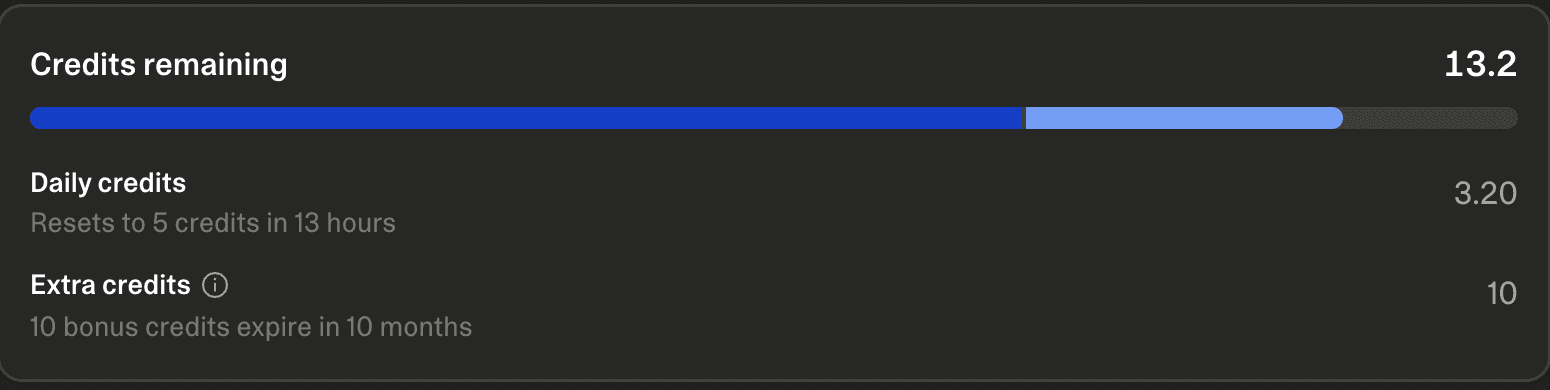
    Lovable's Plans and credits panel on a free workspace: 13.2 credits remaining, split into daily credits at 3.20 that reset to 5, and 10 bonus credits that expire in 10 months
    Our own free workspace after one build, 31 July 2026. The panel shows the split this page describes: a daily grant that resets (3.20 of 5 left after one prompt cost 1.8 credits) and separate bonus credits with their own expiry. One well-structured prompt fits comfortably inside a free day.

    The measured number behind that caption: running one structured library prompt end to end, including Lovable provisioning its backend, cost 1.8 credits in a single round. An unstructured build that needs two correction rounds spends the whole day's grant on the same feature.

    What did three measured runs cost?

    Lovable publishes no per-prompt figure, so we measured. Three library prompts, three fresh projects in Marco's own workspace, each costed by reading the workspace credits page before and after. The landing page in July ran on the free plan and fit inside one day's grant. The two September runs were system-level prompts that provisioned Cloud and, in the SaaS case, had Lovable sign into the app as a test user to check the invite flow; both came in near ten credits, and both spent the day's 5 build credits first before drawing on the balance, which is the consumption order the docs describe.

    Credits consumed per library prompt run, measured before and after
    Landing page + email opt-in1.8 (no question line yet)Empty states and skeletons9.5 (2 questions first)SaaS MVP with user auth10.4 (4 questions first)
    Credits consumed per library prompt run, measured before and after
    Categorycredits
    Landing page + email opt-in1.8 (no question line yet)
    Empty states and skeletons9.5 (2 questions first)
    SaaS MVP with user auth10.4 (4 questions first)

    Read from the Lovable workspace credits page on each run's date (2026-07-31, 2026-09-26, 2026-09-26), Cloud provisioning included. Data in src/data/runs.ts.

    Lovable plans and credit usage page after the SaaS run: 62.4 credits left, daily build credits 0 left, and a usage list showing the Workspace Hub project at 10.4 credits and State Guider at 9.50
    The credits page after the second September run: the per-project usage list is where a run's cost can be read without guessing. Marco's own workspace, 26 September 2026.

    The spread is the useful number: a single page with one write path costs under two credits, a foundation that provisions a backend and tests itself costs about ten. Neither is a price list, both are what a structured prompt spent on a given day, and the screenshots of what came back are on the prompt examples page.

    How do you burn fewer credits?

    This is the part Lovable's documentation does not cover, and where the cost model and prompt structure meet. Build mode charges partly for exploration, so anything that reduces exploration or reduces correction rounds reduces spend.

    1. Plan in Plan mode, build in Build mode

      A Plan mode message is one credit plus any research it runs, and it cannot touch your code. Working out the approach there and then issuing one specific Build instruction is usually cheaper than three exploratory Build messages, and it is strictly safer.

    2. Number your features

      An unordered feature list makes Lovable spread effort evenly and build the wrong thing first. Explicit priority means the expensive generation goes on the feature that matters, and you are not paying to redo it.

    3. Specify the states up front

      Empty, loading and error states are the most common omission and the most common second round of prompting. Asking once costs less than asking again per screen.

    4. State the build order

      Lovable will happily generate an interface it cannot wire to data. Naming the order stops the generation you throw away.

    5. Scope the request to a surface

      Cost scales with how much codebase gets read. A request naming the screen or component is cheaper on a large project than one that makes Lovable go looking.

    6. Do not re-prompt a near-miss from scratch

      Correcting the specific thing that is wrong is a small focused edit. Restating the whole feature is a large generation, and Lovable prices those differently.

    Every prompt in the Lovable prompts library is written to that shape already: numbered priority, explicit states, a build order and constraints that survive later edits. That is a credit-efficiency argument as much as a quality one. If your idea does not match an existing prompt, the generator produces the same structure for it, and how to write prompts for Lovable covers writing them yourself.

    A note on prices

    This page deliberately quotes no prices. Lovable's plans and credit allowances change, and a stale number is worse than no number. Check Lovable's pricing page for current figures. The mechanics on this page are from Lovable's credits and usage documentation and its pricing page, first read on 29 July 2026 and re-read on 26 September 2026. Where Lovable's own wording differs between the two, for example "Default Mode" on the pricing page against "Build mode" in the docs, this page follows the documentation.

    What changed

    • 26 September 2026: re-read against Lovable's current credits page: Build versus Run credits with the stated free monthly Run allowances, Plan mode at one credit plus research instead of flat, the 20-credit check-in and stopped-request rules; two new measured runs charted with the credits page screenshot; hero and a new FAQ.
    • 31 July 2026: the first measured run (1.8 credits) and the free-plan credits panel added.

    Frequently asked

    How many credits does one prompt cost?↓
    Lovable does not publish a per-prompt figure; Build mode is usage-based. Our three measured runs: 1.8 credits for the landing page + email opt-in, 9.5 credits for the empty states and skeletons, 10.4 credits for the saas mvp with user auth, each read from the workspace credits page before and after, Cloud provisioning included where it happened.
    Do Lovable credits roll over or expire?↓
    Both, which is why this is the most misread part of the model. Lovable's documentation says unused monthly plan credits roll over at the end of each billing cycle for as long as the subscription stays active, and separately that monthly plan credits expire two months after they are issued. So rollover is genuine but bounded: a credit issued in month one is still spendable in month two and gone in month three. Top-up credits expire twelve months after purchase.
    What actually consumes a credit?↓
    Three separate things, not just prompting. Build usage covers sending messages to plan, generate, edit or update the app. Cloud usage covers hosting the app and running its built-in backend, including database, network, storage, edge functions and realtime. AI gateway usage covers AI calls your deployed app makes to models. A quiet app with live users can therefore spend credits while you are not building.
    Does a failed generation cost credits?↓
    Lovable's documentation does not state what happens on a failed or errored request. It does state that stopped Build mode requests are charged based on the work completed so far. Treat a stop as partially billable and assume nothing about errors, because the docs do not say.
    How much does one message cost?↓
    A Plan mode message costs one credit plus any subagent research it runs, and never modifies code. Build mode is usage-based, and Lovable says small focused edits usually cost less than larger generations, multi-step changes, or requests that need more codebase exploration. Lovable's pricing page illustrates the spread with a trivial edit at the low end and a landing page with images at the high end.
    Which credits get spent first?↓
    Lovable uses usage-specific grants before general credits, then spends the general credits closest to expiry first. That ordering works in your favour: you do not have to manually spend older credits to avoid losing them.
    What happens to credits if I cancel?↓
    Lovable's pricing page says you keep using remaining credits until the end of the current billing period, after which the workspace reverts to the free plan. Unused paid credits reactivate if you re-subscribe before they expire. Credits are not refundable or redeemable for cash.

    Related reading

    Written by

    Marco Kohns

    Marco Kohns

    Founder of ProtoBites - Venture Growth Studio

    Growth PM at a Silicon Valley scale-up (a16z and General Catalyst backed), ex-Techstars where he consulted 13 early-stage startups, Reforge-trained. Every prompt on this site comes out of shipping ProtoBites' own portfolio products.